Hadoop Migration to AWS: The Flipboard Pattern for Moving HBase to Amazon EMR

Key takeaways
- A Hadoop migration moves the workload, not only the HDFS data. Data, Hive metadata, Spark, MapReduce and HBase jobs, schedules and the security model all cross the boundary, and each one usually lands on a different AWS service.
- Benchmark the target before you commit to it. In Flipboard's migration, four Amazon EMR configurations ran the same YCSB workload, and throughput ranged from about 73,000 to about 219,000 operations per second.
- HBase on Amazon S3 storage mode outran HDFS mode in that test. The only cluster using HDFS storage was the slowest of the four, and the three S3-mode clusters reached about 1.6 to 3 times its throughput.
- Move the data in two steps. Flipboard took one HBase snapshot a week before the cutoff date, then applied periodic incremental updates until the final migration, so the cutover only had to carry the last changes.
- Measure the result against the old cluster. The selected EMR configuration handled 300,000 read and 150,000 write requests, against 100,000 and 55,000 on the self-managed cluster, and Flipboard says engagement improved as a direct result.
If your Hadoop platform is getting expensive to keep running, hard to scale or cut off from your AI plans, the migration question is less about copying HDFS files and more about where each workload should run next. A Hadoop migration has to carry processing jobs, metadata, dependencies, integrations and operational controls along with the data, while production keeps running.
It is usually one workstream inside a wider data modernization program, which also changes how data is governed and consumed. The same assess, validate, cut over and retire sequence used in any cloud data modernization applies here, with Hadoop-specific decisions at every step.
This guide is built on Mactores' migration of Flipboard's high-volume HBase platform to Amazon EMR, which AWS documented in a November 2022 partner write-up co-authored by Mactores' CEO and an AWS partner solutions architect. It also draws on AEP's Hadoop-era meter data pipeline, rebuilt on Amazon EMR and Apache Iceberg, and a legacy EMR footprint consolidated onto Amazon EMR on EKS. AWS service details were checked against AWS documentation in November 2026.
What Does a Hadoop Migration Involve?
A Hadoop migration moves distributed data, compute workloads, processing frameworks, metadata, dependencies, security policies and operating processes from a Hadoop cluster to new infrastructure. A successful one moves the workload, which is more than the data.
The distinction matters because a cluster can be migrated and still miss the business outcome. If the cloud design recreates the same storage coupling, idle compute, manual operations and access limits, the organization has relocated its technical debt rather than retired it.
Which Hadoop components move where on AWS?
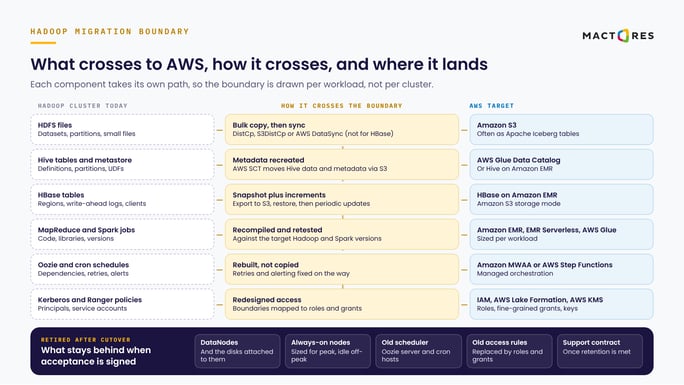
Each component crosses the migration boundary differently, so draw the boundary first: what moves, where it lands and how it gets there.
|
Hadoop component |
Typical AWS target |
How it crosses |
|---|---|---|
|
HDFS files |
Amazon S3 |
DistCp or S3DistCp from the source cluster, or AWS DataSync |
|
Hive tables and metastore |
AWS Glue Data Catalog, or Hive on Amazon EMR |
Metadata recreated on the target; AWS SCT can carry Hive data and metadata |
|
HBase tables |
HBase on Amazon EMR, Amazon S3 storage mode |
Snapshot, export to S3, restore, then incremental updates |
|
MapReduce jobs |
Amazon EMR, often transient clusters |
Recompiled against the target Hadoop version |
|
Spark jobs |
Amazon EMR on EC2 or EKS, EMR Serverless, AWS Glue |
Spark version and libraries tested job by job |
|
HiveQL and UDFs |
Hive on EMR, Spark SQL, or Iceberg tables |
Kept, or rewritten where the workload has outgrown them |
|
Oozie and cron schedules |
Amazon MWAA or AWS Step Functions |
Dependencies, retries and alerting rebuilt |
|
Kerberos and Ranger policies |
IAM, AWS Lake Formation, AWS KMS |
Access boundaries redesigned, not copied |
Is Hadoop still relevant in 2026?
The engines are. Amazon EMR 7.14.0 still ships Hadoop 3.4.2, HBase 2.6.4, Spark 3.5.8 and Hive 3.1.3, alongside Apache Iceberg 1.10.1. What estates are leaving is the model that ties storage to always-on compute: persistent data moves to Amazon S3, often in open table formats, and clusters run only while jobs need them.
Open tables are what let several engines share that data safely. Moving Hive tables to Apache Iceberg on AWS gives Amazon EMR, Amazon Athena and Amazon Redshift transactional tables over the same files, which HDFS-era Hive tables don't provide.
Why Are Enterprises Moving Hadoop to AWS?
Hardware refresh is rarely the only reason. The case usually forms when infrastructure cost, engineering time spent keeping the cluster alive, capacity planning, job performance and data access start to constrain the business, and the existing cluster still works but costs more each year to keep working.
|
Trigger |
What it looks like today |
What the migration should change |
|---|---|---|
|
Infrastructure cost |
Idle clusters sized for peak, storage tied to compute |
Compute sized per workload, data in S3 |
|
Performance |
Long-running jobs, queue contention, latency spikes |
A target chosen by benchmark |
|
Operational overhead |
Manual provisioning, patching, restarts |
Managed clusters and automation |
|
Data growth |
Every terabyte means new nodes |
Elastic storage, compute that scales separately |
|
AI readiness |
Data locked in cluster formats and jobs nobody owns |
Governed, shared tables AI can read |
|
Unsupported versions |
Old distributions and libraries |
Current, supported engine versions |
|
Continuity risk |
Any change risks downtime |
Parallel runs, validation and staged cutover |
Decide on a measured baseline: infrastructure and license cost, storage growth, compute utilization, job runtimes and failure rates, query latency, engineering hours spent on upkeep, recovery objectives and security requirements. Without it, a proposal can price AWS infrastructure and still miss what the current platform really costs to run.
What Is the Flipboard Pattern for Hadoop Migration?
The Flipboard pattern is a Hadoop migration that picks its target by benchmark, separates storage from compute, moves data as a snapshot plus incremental updates, and validates against the old platform before cutover. Mactores used it to move Flipboard's legacy Hadoop-backed database to Amazon EMR under live engagement load.
Flipboard aggregates content and personalizes it for each reader, and AWS's write-up describes more than 100 million active users. The platform was a self-managed HBase cluster on Amazon EC2, processing 40 TB on Amazon EBS, and the team needed a move that wouldn't disrupt the product. Because that cluster already ran on EC2, the migration was self-managed to managed rather than on-premises to cloud; an on-premises estate follows the same pattern with a network transfer added up front.
How did Mactores approach Flipboard's migration?
Five decisions shaped it, and each one carries over to other Hadoop estates.
|
Decision |
What happened at Flipboard |
What to carry into your migration |
|---|---|---|
|
Leave self-managed for managed |
HBase 1.4 on self-managed EC2 moved to HBase 2.2.6 on Amazon EMR 6.2.0 |
Test the major-version jump as its own track |
|
Separate storage from compute |
HBase on Amazon S3 storage mode; MapReduce on a separate transient EMR cluster with auto scaling |
Keep persistent data in S3 and size each cluster for its job |
|
Benchmark the target |
YCSB run against four EMR configurations |
Use your own read and write mix, not defaults |
|
Move in two steps |
One snapshot a week before cutoff, then periodic incremental updates |
Keep the final sync small |
|
Validate in parallel |
A validation harness checked the new foundation against the old one for the whole move |
Gate the cutover on matching results |
The split of work followed Mactores' delivery model. Aedeon, the agent platform we deliver with, ran discovery across Flipboard's data systems, schema mapping, lineage extraction and the parallel validation harness. Forward-deployed engineers owned the target architecture, the data-access decisions, the resilience model under peak load, the cutover plan with Flipboard's engineering team and production sign-off.
What did the YCSB benchmark show?
Configuration changed throughput by a factor of three on the same workload. AWS's write-up of the Flipboard migration reports these YCSB results for the four Amazon EMR configurations tested.
|
Cluster |
Storage mode |
Nodes |
Throughput (ops/sec) |
|---|---|---|---|
|
Cluster 1 |
HDFS |
3 m5.2xlarge primary, 15 i3.8xlarge core |
73,117 |
|
Cluster 2 |
Amazon S3 |
3 r5a.8xlarge primary, 15 r5a.8xlarge core |
115,021 |
|
Cluster 3 |
Amazon S3 |
3 r6g.8xlarge primary, 15 r6g.8xlarge core |
219,114 |
|
Cluster 4 |
Amazon S3 |
3 r6g.12xlarge primary, 9 r6g.12xlarge core |
219,045 |
Average read latency in the same table fell by about two-thirds between Cluster 1 and Cluster 3. Cluster 4 matched Cluster 3's throughput with nine core nodes instead of 15, and it is the shape Flipboard's production cluster used. Instance families differ across the four, so treat the results as Flipboard's evidence for its own workload rather than a general Amazon EMR benchmark.
How did the migrated platform compare with the self-managed cluster?
The selected configuration roughly tripled capacity: the write-up reports "3X improved performance across Read and Write requests".
|
Requests |
Self-managed HBase on EC2 |
Amazon EMR, Cluster 4 |
|---|---|---|
|
Read |
100,000 |
300,000 |
|
Write |
55,000 |
150,000 |
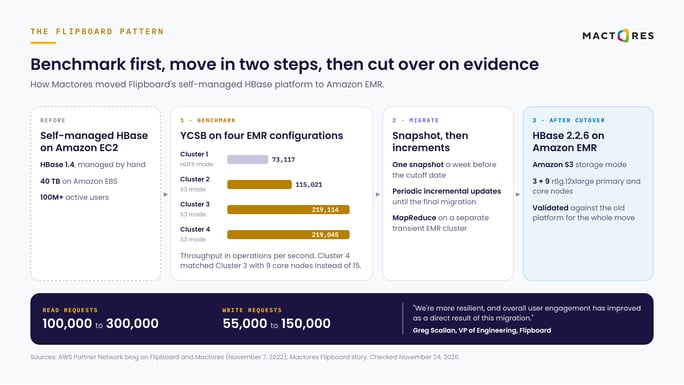
The platform stayed stable through peak engagement periods, and the observability built during the move stayed with Flipboard's team after handover. Flipboard's VP of Engineering, Greg Scallan, put the outcome on the record: "We're more resilient, and overall user engagement has improved as a direct result of this migration."
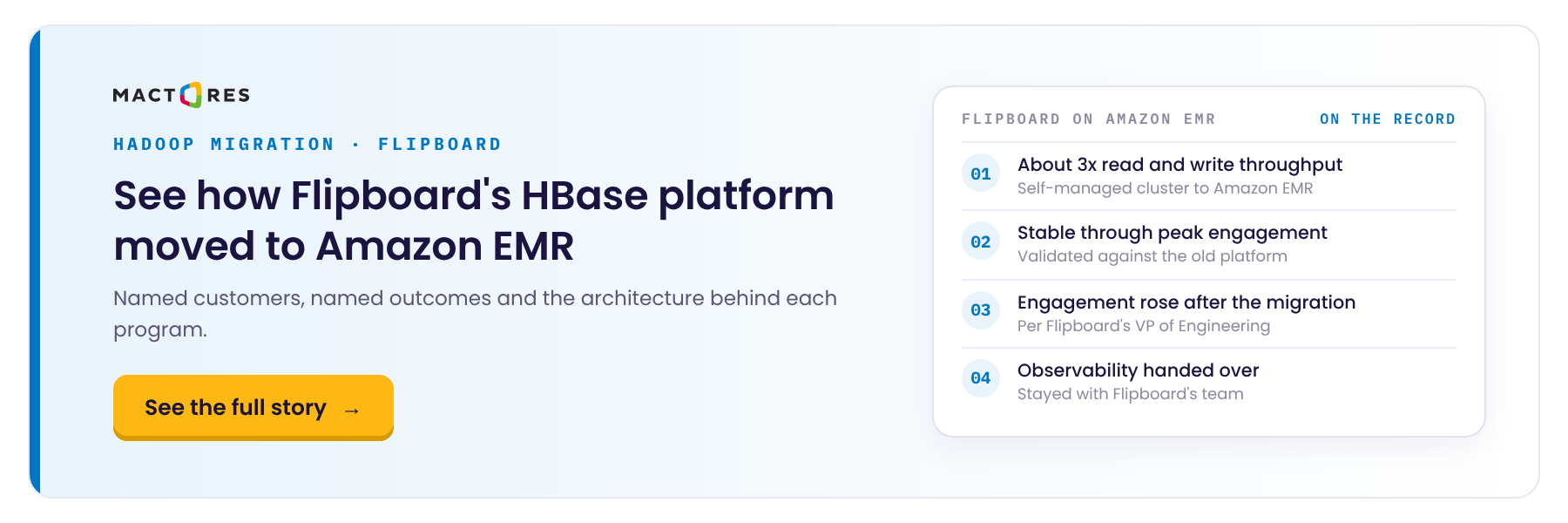
Flipboard is one of the named programs on the Mactores stories page, with the architecture and outcome behind each one.
Which AWS Target Fits Each Hadoop Workload?
Choose per workload: Amazon EMR on EC2 for HBase and heavily tuned or long-running jobs, Amazon EMR on EKS where Kubernetes already runs your compute, EMR Serverless for intermittent Spark and Hive jobs, and AWS Glue for ETL with few Hadoop dependencies. Most estates end up using more than one.
|
Target |
Best suited for |
Advantages |
Trade-offs |
|---|---|---|---|
|
Amazon EMR on EC2 |
HBase, long-running or heavily tuned jobs, complex dependencies |
Cluster-level control and tuning |
You manage cluster lifecycle and capacity |
|
Transient EMR clusters over S3 |
Batch ETL and Spark jobs on a schedule |
No idle hours between runs |
Orchestration and start-up time |
|
Amazon EMR on EKS |
Teams already running Kubernetes |
Shared container platform |
Needs Kubernetes skills |
|
EMR Serverless |
Intermittent Spark or Hive jobs |
No clusters to size or run |
Less control over runtime and resources |
|
AWS Glue |
ETL and catalog work with few Hadoop ties |
Managed ETL and metadata |
Not a home for HBase or every Hadoop job |
For HBase, assess region server configuration, storage mode, write-ahead log handling, caching, client compatibility, replication and latency targets before choosing EMR on EC2 settings. Flipboard's benchmark is the evidence that those settings matter.
EMR on EKS earns its place when Kubernetes is already your operating model. In one Mactores program, a legacy EMR footprint was consolidated onto Amazon EMR on EKS, and the data team moved its time from infrastructure maintenance to analytical work. A Kubernetes-based design isn't automatically cheaper or simpler, so price each option against your own job pattern; Amazon EMR pricing differs by deployment model in ways the rate card alone doesn't show.
Sometimes the right target is a rewrite. At AEP, the interval meter pipeline ran 17-hour jobs until Mactores' AI agents found that HiveQL on HDFS was structurally wrong for the workload; engineers kept Amazon EMR, rewrote the jobs in PySpark, moved storage to Apache Iceberg on Amazon S3, and the pipeline reached production in 13 weeks at 17 times the speed.
How Do You Plan a Hadoop Migration to AWS Without Disrupting Production?
Run it in phases with signed exit criteria, and move production only when validation shows the target matches the old cluster. The Flipboard pattern gives the order: assess, design, migrate incrementally, validate in parallel, then cut over and retire.
|
Phase |
Main work |
Exit gate |
|---|---|---|
|
1. Assess |
Inventory, workload analysis, dependencies, baseline |
Inventory, workload scorecard, risk register and business case approved |
|
2. Design |
Target storage, compute, security and cost per workload; benchmark |
Architecture, migration sequence and acceptance criteria signed off |
|
3. Migrate |
Bulk copy, incremental sync, job and schedule rebuilds |
Datasets and jobs running on AWS |
|
4. Validate |
Integrity, performance, security, resilience, parallel runs |
Evidence approved by the business owner |
|
5. Cut over and retire |
Final sync, switch, monitoring, handover |
Workloads live on AWS and the cluster decommissioned |
How should you assess the existing Hadoop cluster?
Capture what each component holds and who depends on it, then sort workloads into those that move as they are, those that need configuration changes and those that should be redesigned.
|
Area |
What to capture |
|---|---|
|
HDFS |
Dataset sizes, replication factor, file counts, small files, growth, owners |
|
HBase |
Table schemas, region distribution, write-ahead log setup, clients, access patterns |
|
Hive |
Metastore, table definitions, partitions, UDFs, query patterns, consumers |
|
Spark and MapReduce |
Runtime versions, libraries, job inventory, runtimes, failure rates |
|
Scheduling |
Oozie coordinators, cron jobs, dependencies, processing windows |
|
Security |
Kerberos principals, Ranger or Sentry policies, service accounts, audit needs |
|
Operations and cost |
Node types, utilization, incident history, licenses, engineering hours |
How do you move Hadoop data and jobs to AWS?
Pick a method per asset, and sequence by dependency so a table never moves without the jobs and consumers that read it.
|
Asset |
Method |
Watch for |
|---|---|---|
|
HDFS files |
DistCp or S3DistCp from the cluster, or AWS DataSync |
DataSync doesn't cover HDFS clusters that use Apache HBase |
|
Hive data and metadata |
AWS SCT copies data and metadata to S3, then recreates Hive objects on Amazon EMR |
Needs AWS SCT 1.0.670 or later |
|
HBase tables |
Snapshot, export to S3, restore; table export and import; or CopyTable per table |
One active cluster per HBase root directory in S3 |
|
MapReduce and Spark jobs |
Recompile or retest against the target versions |
Library and version drift |
|
Oozie schedules |
Rebuilt in Amazon MWAA or AWS Step Functions |
Hidden dependencies between coordinators |
AWS DataSync transfers data between an HDFS cluster and Amazon S3 with simple or Kerberos authentication, but it doesn't support HDFS clusters using Apache HBase, so HBase needs its own path. For Hive estates, AWS SCT migrates data and metadata from the source Hadoop cluster to an Amazon S3 bucket and then uses the Hive metadata to create the database objects in Amazon EMR.
Hive UDFs and Oozie coordinators are where Hadoop estates keep their surprises, which is why a Hadoop to EMR migration is usually planned around them rather than around the data volume.
How should you validate a Hadoop migration before cutover?
Make validation a formal gate: compare data, query results and job outputs between the two platforms, and test performance against the baseline at production load.
|
Area |
What to test |
Evidence to keep |
|---|---|---|
|
Data integrity |
Record counts, checksums, schemas, reconciliation |
Reconciliation reports |
|
HBase |
Read and write tests, region behavior, client compatibility, latency |
Benchmark results |
|
Spark and MapReduce |
Runtimes, output consistency, dependencies |
Job test reports |
|
Hive |
Query results, metadata, partitions |
Query comparisons |
|
Performance |
Throughput, latency, concurrency, peak load |
Benchmark results |
|
Security |
Authentication, authorization, encryption, logging |
Security test records |
|
Resilience and operations |
Recovery, restart, monitoring, alerting, runbooks |
Operational acceptance |
How should you cut over and retire the Hadoop cluster?
Cut over after a final incremental sync and reconciliation, keep rollback conditions open for an agreed window, and retire the cluster only when the target has met its acceptance criteria. A controlled cutover follows these steps.
- Confirm the target is ready and the acceptance criteria are signed.
- Freeze or coordinate changes to critical source workloads.
- Run the final incremental sync and reconcile source and target.
- Check application connectivity and run production jobs on the target.
- Move traffic and schedules, then watch latency, errors and consistency.
- Hold rollback conditions for the agreed window, then get business sign-off.
- Decommission the cluster once retention and acceptance conditions are met.
HBase on Amazon S3 helps here because the HBase root directory, store files and table metadata live in Amazon S3, outside the cluster, while write-ahead logs stay in HDFS on the cluster. Only one active cluster can use a root directory at a time, though read-replica clusters can serve reads from it, and from Amazon EMR 7.12.0 a read replica can be switched to active mode.
How Do You Secure a Hadoop Migration on AWS?
Design the controls into the target before data moves, because the migration changes where data lives, which systems read it and how identities authenticate. Hadoop's Kerberos principals and Ranger or Sentry policies don't map one to one onto AWS, so rebuild the access boundaries rather than copy them.
|
Control |
On AWS |
|---|---|
|
Identity |
IAM roles per workload and service, least privilege |
|
Data access |
AWS Lake Formation permissions on databases, tables, columns, rows and cells |
|
Encryption |
AWS KMS keys at rest, TLS in transit, key ownership and rotation |
|
Network |
Private subnets, VPC endpoints, controlled access to clusters |
|
Audit |
AWS CloudTrail and cluster logs collected centrally |
|
Secrets |
Credentials removed from job code and stored centrally |
|
Migration access |
Temporary, scoped permissions for transfer tooling |
AWS provides the services, and the organization still owns its data, configuration, access policies and evidence. Map HIPAA, PCI DSS, GDPR, SOC 2 or internal policy requirements to the target design, agree the acceptance criteria with security and data owners, and test them before regulated workloads move.
How Much Does a Hadoop Migration to AWS Cost?
It depends on data volume, workload complexity, the target services, validation effort and how long both platforms run side by side. Two clusters of the same size can need very different effort, because dependencies, applications, access patterns and downtime limits drive the work more than terabytes do.
|
Cost driver |
What adds to it |
How to contain it |
|---|---|---|
|
Migration engineering |
Discovery, mapping, job conversion, validation |
Automate the repetitive analysis and testing |
|
Data transfer |
Bulk copy, incremental sync, network |
Match the method to volume and change rate |
|
Compute |
EMR, EKS, Serverless or Glue usage |
Size per workload; shut down idle clusters |
|
Storage |
S3 and any cluster storage |
Lifecycle policies and open table formats |
|
Parallel running |
Both platforms live at once |
Short, gated transition windows |
|
Testing |
Benchmarks, stress and regression runs |
Repeatable test suites |
|
Retirement |
Decommissioning, retained data, contracts |
Plan retirement from the start |
Compare total cost of ownership over a defined period rather than one month's Hadoop bill against one month's AWS estimate. The model should cover current operating cost, target operating cost, the migration program, parallel running, licensing, engineering effort and the date the cluster retires, and it should separate projected savings from savings measured against the baseline.
What Risks Should You Address Before Moving Hadoop Workloads?
The costly failures usually start before the migration: an incomplete inventory, untested dependencies, vague cutover conditions or a target nobody benchmarked.
|
Risk |
What can go wrong |
Mitigation |
|---|---|---|
|
Incomplete inventory |
Jobs, tables or consumers are missed |
Map data, jobs, applications and consumers first |
|
Data integrity |
Data arrives incomplete or inconsistent |
Checksums, reconciliation and test queries |
|
Application incompatibility |
Client libraries or versions fail |
Compatibility tests per client |
|
Performance regression |
Latency or throughput misses targets |
Benchmark representative workloads |
|
Cost overruns |
Oversized clusters, long parallel runs |
Baseline model and staged retirement |
|
Security gaps |
Broad permissions or missing audit logs |
Least privilege, tested before cutover |
|
Cutover failure |
Clients can't connect or the sync is incomplete |
Rehearsal, rollback criteria, final reconciliation |
|
Operational readiness |
Teams can't run the new platform |
Runbooks, monitoring and named owners |
Keep a risk register with an owner, a mitigation and a measurable exit condition for each risk, and call the migration ready for cutover once each significant risk has been tested against its exit condition.
What Does the Flipboard Migration Teach About Modernizing Hadoop?
Judge a Hadoop migration by what the platform can do after cutover. Flipboard's move shows three habits worth copying.
- Benchmark the target before committing to it, with your own workload, because configuration changed throughput threefold in Flipboard's tests.
- Modernize while you migrate: storage in S3, MapReduce on its own transient cluster and a current HBase version, so the target isn't a copy of the old cluster.
- Treat cutover as an engineering milestone gated on integrity, compatibility and performance evidence.
Our data platform modernization work starts from estates like these: a legacy warehouse, an on-premises Hadoop cluster or pipelines no one owns. Mactores is an AWS Premier Tier Services Partner, has built on AWS since 2008, and holds 17 AWS Service Validations, including Amazon EMR and AWS Glue.
When you evaluate any Hadoop migration partner, ourselves included, ask for named production migrations with measured outcomes, the benchmark method behind the target choice, how data is synchronized and validated, who owns cutover and production sign-off, and whether the cutover date and legacy retirement are written into the contract.
If you're planning a Hadoop migration, thirty minutes with the engineer who would own the work is enough to agree the target for each workload, the benchmark and a cutover date.