.svg)
.svg)
.svg)
According to Gartner's 2025 IT spending forecast, enterprise IT costs are projected to grow 9.3% year-over-year, with database licensing remaining one of the top three budget drains for large organizations. For many enterprises, Oracle sits at the center of that pressure, consuming millions annually in licensing, support fees, and compliance overhead while delivering diminishing returns in a cloud-first, AI-accelerated world.
Every dollar locked inside Oracle's licensing and support structure is a dollar not funding the AI capabilities that define competitive advantage in 2026. Enterprises that redirect Oracle spend toward AI infrastructure, model training pipelines, real-time data platforms, vector search layers for RAG-based applications aren't just cutting costs. They're converting legacy overhead into forward-looking capability.
A $1–2M annual reduction in Oracle licensing alone can fund a production-grade ML platform on Amazon SageMaker, a real-time analytics pipeline, and multiple AI engineering roles.
The math is straightforward. Oracle costs less when you need it less, and you need it less the moment modern cloud-native databases prove they can carry the load.
Can You Really Reduce Oracle Costs in 10 Weeks?
Yes, you can. With the right scoping, tooling, and governance structure, enterprises can meaningfully reduce Oracle spend within a 10-week window. The key is not attempting a full migration in that timeframe, but executing a structured, phased reduction that identifies quick wins, initiates migration for targeted workloads, and creates the operational conditions for sustained savings.
The reason most Oracle migrations stall is timeline fatigue. Traditional approaches treat each migration phase as a sequential, months-long endeavor, burning budget and organizational patience before a single workload ever reaches production on the target platform. Contrast that with an accelerated delivery model, and the difference is stark:
-1.jpg?width=4300&height=2441&name=Untitled%20design%20(3)-1.jpg)
Pre-built conversion playbooks, automated schema assessment tooling, parallel workstream execution, and cloud-native replication infrastructure collapse timelines that traditionally expand due to manual effort, waterfall sequencing, and tooling gaps. A 10-week Oracle cost reduction engagement using this model typically yields 30–40% in licensing savings on targeted workloads, with full program payback achievable within 12–18 months.
This is feasible because most enterprises are over-licensed, running Oracle on infrastructure that doesn't require enterprise-grade features, or paying for capabilities that modern cloud-native databases replicate at a fraction of the cost. This isn't a moonshot. It's a structured program — and it starts with understanding exactly where your money is going.
Why Oracle Costs Are Draining Innovation Budgets
Oracle's licensing model was designed in a different era of computing. One where on-premises infrastructure was the only option and database workloads were monolithic. In 2026, that model creates structural inefficiency for most enterprises.
- Licensing complexity is the first cost multiplier. Oracle sells licenses under two primary models: Processor-based licensing and Named User Plus (NUP). Processor licenses are priced per core, with a core factor applied depending on the chip architecture (0.5 for Intel/AMD, 1.0 for SPARC). For a 64-core Intel server, that means 32 license units — at roughly $47,500 per Processor license for Oracle Database Enterprise Edition. A single mid-sized database cluster can easily consume $3–5M in licensing. NUP licenses are nominally cheaper per user but require a minimum of 25 users per Processor, making them inefficient for large, broad-access environments.
- Annual support compounds the problem. Oracle charges approximately 22% of net license fees annually for software updates and technical support. On a $4M licensing footprint, that's $880,000 per year. And unlike cloud-native databases, where updates are automatic and included, Oracle support contracts often deliver modest operational value relative to cost.
- Vendor lock-in removes negotiating leverage. Oracle's ecosystem — APEX, RAC, Partitioning, Advanced Compression — creates deep architectural dependencies that make exits feel prohibitively expensive. This is by design. The longer workloads remain on Oracle, the more deeply intertwined they become with proprietary features, and the harder a migration becomes. That lock-in translates directly into reduced leverage during renewal negotiations.
Together, these factors divert capital that could otherwise fund AI infrastructure, data platform modernization, and engineering velocity.
Where Does Your Oracle Spend Actually Go?
Most organizations lack full visibility into their Oracle cost structure. The table below breaks down typical spend categories for a mid-market enterprise with a $5M Oracle footprint:
|
Cost Category |
Typical Share of Total Spend |
Annual Estimate (on $5M base) |
|
Database Enterprise Edition Licenses |
45–50% |
$2.25M–$2.5M |
|
Annual Support & Maintenance (22%) |
18–22% |
$900K–$1.1M |
|
Oracle Options (Partitioning, RAC, etc.) |
10–15% |
$500K–$750K |
|
Infrastructure (on-prem servers, storage) |
10–12% |
$500K–$600K |
|
DBA and Operations Labor |
8–12% |
$400K–$600K |
|
Compliance and Audit Costs |
2–5% |
$100K–$250K |
|
Total |
100% |
~$4.65M–$5.8M |
A critical insight here: Oracle Options are often licensed even when not actively used. Partitioning and Advanced Compression are frequently enabled by default in some configurations, triggering license obligations even when intentionally unused. A license management audit often surfaces six-figure "phantom" costs within the first two weeks of any reduction program.
The 10-Week Oracle Cost Reduction Roadmap
This is the operational core of the program. The timeline outlined below maps directly to the accelerated delivery model shown earlier, Discovery in days, not weeks, Schema Conversion in weeks, not months, because each phase is designed around parallel execution and automated tooling rather than sequential handoffs. The discipline of the timeline matters: urgency prevents the engagement from stalling in analysis paralysis, which is exactly how traditional migrations balloon to 10–14 months.
Days 1–5: Discovery and License Audit
The first five days are entirely diagnostic. The goal is to build a complete, accurate picture of your Oracle licensing position, workload topology, and infrastructure dependencies — fast.
Actions:
- Deploy Oracle's License Management Services (LMS) scripts — or third-party tools like Rimini Street's License Advisor or Flexera — to inventory all Oracle products in use across environments.
- Map processor counts per host, including virtual environments. VMware clusters require special attention: Oracle's hard partitioning rules mean soft partitioning (vSphere vMotion) does not limit license exposure by default.
- Identify which Oracle Options and Management Packs are enabled, with or without active use.
- Catalog workload characteristics: transaction volumes, peak concurrency, data volumes, latency SLAs, and downstream dependencies.
- Flag any Oracle features that overlap with AWS-native capabilities (e.g., Oracle Advanced Queuing vs. Amazon SQS, Oracle Spatial vs. PostGIS on Aurora).
Output: A signed-off License Rationalization Report and a Workload Migration Candidate List ranked by migration complexity (Low / Medium / High).
Weeks 1–4: Schema Conversion and Architecture Design
With discovery complete, this phase immediately defines the technical migration path for each workload tier and executes schema conversion in parallel. The overlap is intentional: there's no reason to wait for a formal handoff.
Actions:
-
Segment workloads into three tracks, which are:
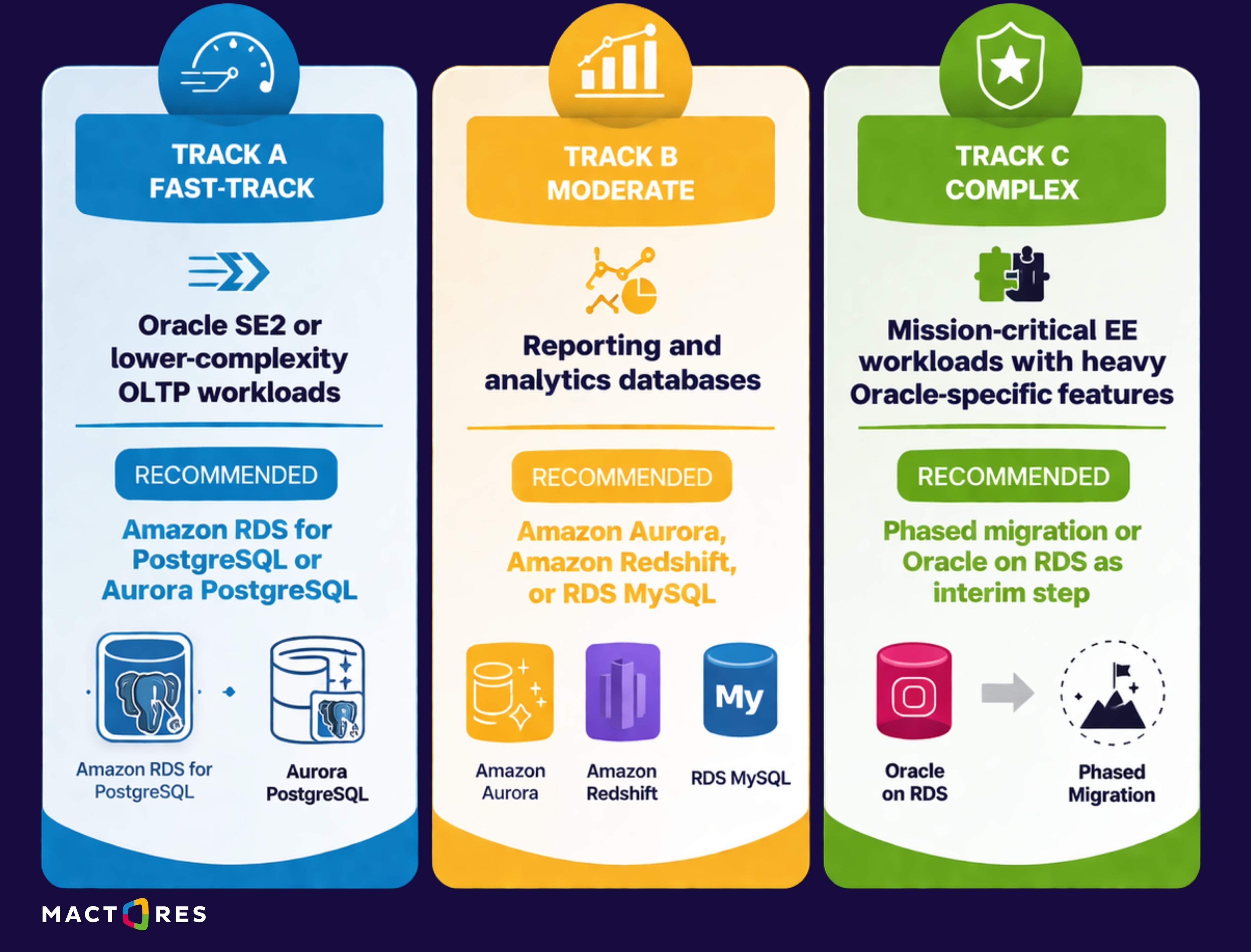
- Run AWS Schema Conversion Tool (SCT) against Track A and B schemas. SCT generates a conversion complexity report flagging stored procedures, PL/SQL packages, triggers, and data type incompatibilities.
- Estimate conversion effort in engineering days per workload.
- Design the target architecture: VPC topology, subnet configuration, Multi-AZ deployment, parameter group settings, and IAM roles.
- Define rollback procedures for each workload before migration begins.
Output: A validated Target Architecture Document and a phased Migration Execution Plan with resource assignments. Schema conversion complete for Track A workloads; Track B conversion underway.
Weeks 5–6: Data Migration
This phase executes full data migrations for Track A workloads — the lowest-risk candidates with the highest speed-to-savings ratio — while Track B migrations begin replication setup in parallel.
Actions:
-
Use AWS Database Migration Service (DMS) to configure replication instances. DMS supports full-load-plus-CDC (Change Data Capture) mode, enabling near-zero-downtime migration by replicating ongoing changes during the initial bulk transfer.
-
Convert PL/SQL logic flagged by SCT using the manual conversion playbook developed in Phase 2. For most Track A workloads, this involves rewriting stored procedures in PL/pgSQL and replacing Oracle-specific functions (e.g., DECODE, NVL, ROWNUM) with PostgreSQL equivalents.
-
Execute full-load migrations in staging environments first. Run parallel validation queries to compare row counts, checksums, and sample data sets between the source Oracle and the target Aurora/RDS.
-
Run application regression suites against the migrated staging instance.
-
Tune Aurora parameter groups: work_mem, shared_buffers, checkpoint_completion_target, and max_connections are the most impactful for initial performance parity.
Output: Validated staging migrations for Track A workloads, with a documented performance benchmark comparison.
Weeks 7–8: Testing and Pre-Production Validation
This phase runs structured testing across all migrated workloads before any production cutover is authorized. Load testing, regression suites, and data integrity checks happen here in parallel across both Track A and Track B environments.
Actions:
-
Establish DMS ongoing replication tasks for Track B workloads to begin data synchronization with target environments.
-
Conduct load testing using production-representative traffic profiles (tools: HammerDB, pgbench, or a replayed production workload trace).
-
Validate application behavior under load: connection pool behavior, query plan stability, locking, and contention patterns.
-
Begin formal Oracle license de-commitment planning. Work with Oracle account management or a third-party negotiator to identify contractual options: partial termination, license buyback, or support downgrade.
Output: Production-ready Track A and Track B environments. Initiated Oracle license reduction proceedings.
Weeks 9–10: Production Cutover and Cost Capture
The final phase executes production cutovers and formalizes the financial savings.
Actions:
-
Schedule maintenance windows for Track A production cutovers. DMS CDC lag should be under 5 seconds before initiating cutover. Stop application write traffic, allow DMS to drain the final change set, then flip the application connection string to Aurora/RDS.
-
Monitor for 48–72 hours post-cutover using CloudWatch metrics, application error rates, slow query logs, and connection pool utilization.
-
Decommission Oracle instances progressively as cutover confirmation is received. Do not decommission until a 30-day observation window is complete for each workload.
-
File Oracle license return or reduction documentation. Update internal CMDB and software asset management (SAM) records.
-
Produce a Week 10 Savings Report quantifying licenses retired, support fees eliminated, infrastructure decommissioned, and DBA hours reallocated.
Output: Live production workloads on Aurora/RDS, documented savings baseline, and a 90-day savings run rate projection.
What Tools Accelerate Oracle Migration?
Two AWS-native tools do most of the heavy lifting in an Oracle-to-AWS migration:
-
AWS Database Migration Service (DMS): It handles the data movement layer. It supports Oracle as a source in both full-load and CDC modes, handles LOB columns and Oracle-specific data types, and provides migration task monitoring through the AWS Console and CloudWatch. DMS replication instances are sized by compute and memory (dms.r5.xlarge is a common starting point for moderate workloads). One important consideration is that DMS does not migrate database objects, stored procedures, triggers, views, or sequences, only data. Object migration is handled separately.
-
AWS Schema Conversion Tool (SCT): It addresses the schema and code conversion layer. SCT analyzes Oracle DDL and PL/SQL, assigns an action code to each object (Automatically Converted, Requires Minor Conversion, Requires Manual Conversion), and generates a conversion complexity assessment score. For most enterprises, 60–75% of simple OLTP schema objects convert automatically. The remaining 25–40%, complex PL/SQL packages, dynamic SQL, and Oracle-specific analytic functions, require human intervention. SCT also produces a multiserver assessment report, which is invaluable for prioritizing migration candidates at scale.
Why AWS Is a Strong Alternative to Oracle
Amazon RDS for Oracle is a useful bridge for workloads with complex Oracle dependencies that aren't ready for a database engine change. It eliminates infrastructure management overhead while maintaining Oracle compatibility, and it allows teams to defer application refactoring. However, it does not eliminate Oracle licensing costs — RDS for Oracle uses either BYOL (Bring Your Own License) or License Included pricing, which for Enterprise Edition is approximately $0.475/hour for db.r5.2xlarge. It's a stepping stone, not a destination.
On the other hand, Amazon Aurora PostgreSQL is the destination for most Oracle migration workloads. Aurora delivers up to 3x the throughput of standard PostgreSQL, offers automatic storage scaling up to 128TB, provides multi-region replication via Aurora Global Database, and costs roughly 10% of comparable Oracle Enterprise Edition deployments for equivalent workloads. Aurora's serverless v2 option eliminates over-provisioning by scaling compute in fine-grained increments (0.5 to 128 Aurora Capacity Units) in response to actual demand — directly addressing one of Oracle's structural cost problems.
For analytics-heavy workloads, Amazon Redshift or Aurora combined with Amazon Athena and AWS Glue provides a modern data platform that eliminates Oracle OLAP licensing.
Risks in a 10-Week Migration (And How to Mitigate Them)
A 10-week Oracle-to-AWS migration is not without risk. Every migration of this scale carries technical, organizational, and operational exposure that deserves honest acknowledgment. What experience does, however, is transform unknown risks into manageable ones.
Across 50+ enterprise migrations, we've developed a precise understanding of where risks surface, how early warning signs appear, and what interventions reliably contain them. The table below reflects that accumulated pattern recognition — not theoretical caution, but field-tested mitigation strategies drawn from real production engagements.
|
Risk |
Likelihood |
Impact |
Mitigation |
|
PL/SQL conversion underestimated |
High |
High |
Run SCT assessment in Week 1, not Week 3 |
|
Application query plan regression |
Medium |
High |
Validate with pg_stat_statements; use query hints or pg_hint_plan |
|
Oracle audit triggered during exit |
Medium |
Medium |
Engage a third-party SAM advisor before notifying Oracle |
|
Data type incompatibilities in CDC |
Medium |
Medium |
Test with the full production data sample before go-live |
|
DBA resistance and knowledge gaps |
High |
Medium |
Pair Oracle DBAs with AWS-certified PostgreSQL SMEs early |
|
Rollback plan insufficient |
Low |
Critical |
Maintain the source Oracle instance for 30 days post-cutover |
What Happens After Oracle? Funding AI-Driven Growth
A $1–2M annual reduction in Oracle spend creates meaningful runway for AI infrastructure investment. In practical terms, that budget funds: a dedicated ML platform on Amazon SageMaker, a real-time data pipeline using Amazon Kinesis and Apache Flink, a vector database layer (Amazon OpenSearch or pgvector on Aurora) for enterprise AI applications using RAG architecture, and 3–4 dedicated AI/data engineering roles.
More importantly, migrating to Aurora and modern cloud-native databases creates the data architecture that AI actually requires. Oracle's proprietary data formats, licensing restrictions on data export, and infrastructure complexity make it genuinely difficult to build real-time AI pipelines on top of Oracle. Aurora's native integration with AWS Glue, Lake Formation, Bedrock, and SageMaker removes those barriers entirely.
The migration isn't just a cost play. It's a platform play that determines your AI readiness for the next three to five years.