.svg)
.svg)
.svg)
Most teams building enterprise LLM systems spend their optimization budget in the wrong place. They fine-tune models, rebuild RAG pipelines, experiment with chunking strategies, and debate vector databases — while paying full input token price on the same 2,000-word system prompt, every single request, thousands of times a day.
The math on that is brutal. If your system prompt is 2,000 tokens and you're running 100,000 daily requests, you're billing 200 million tokens a day on content that never changes. At Claude 3.5 Sonnet pricing on Bedrock, that's a significant chunk of your monthly AI spend — on identical input, repeatedly processed, because no one stopped to ask whether it had to be.
This is the problem prompt architecture solves. Not just caching — the whole discipline of how you structure, layer, and manage what goes into the context window before the model ever sees the user's message.
In the previous post, we covered Production LLM Fine-Tuning with LoRA & QLoRA on AWS — how to adapt base models to domain-specific behavior without full retraining. But even a perfectly fine-tuned model underperforms when the prompt feeding it is architecturally sloppy. That's what this post addresses.
The uncomfortable truth is that prompt engineering is still the highest-ROI lever in enterprise AI, and most teams treat it as a pre-launch task rather than a continuous engineering discipline. A well-designed prompt architecture with proper caching routinely cuts input token costs by 90%, reduces latency by more than 80%, and eliminates 20–60% of LLM calls entirely through semantic deduplication. Those aren't marketing numbers. They're what happens when you stop sending redundant tokens and start treating your context window like the scarce, billable resource it actually is.
This post breaks down how to get there, from how a production prompt should be structured, to implementing prompt caching on AWS Bedrock, to the memory strategies that either protect or destroy your cache hit rate. It's the companion guide to Part 3 of the Enterprise LLM Architecture series, and it assumes you're already building in production, not evaluating whether LLMs are worth trying.
Prefer video over text? Watch the full breakdown here: [link]
How a Production Prompt Is Actually Structured?
Most engineers writing their first production prompt treat it as a single block of text, instructions, examples, and context, all mixed with no clear boundaries. That works in a notebook. It falls apart at scale, both in output quality and cost predictability.
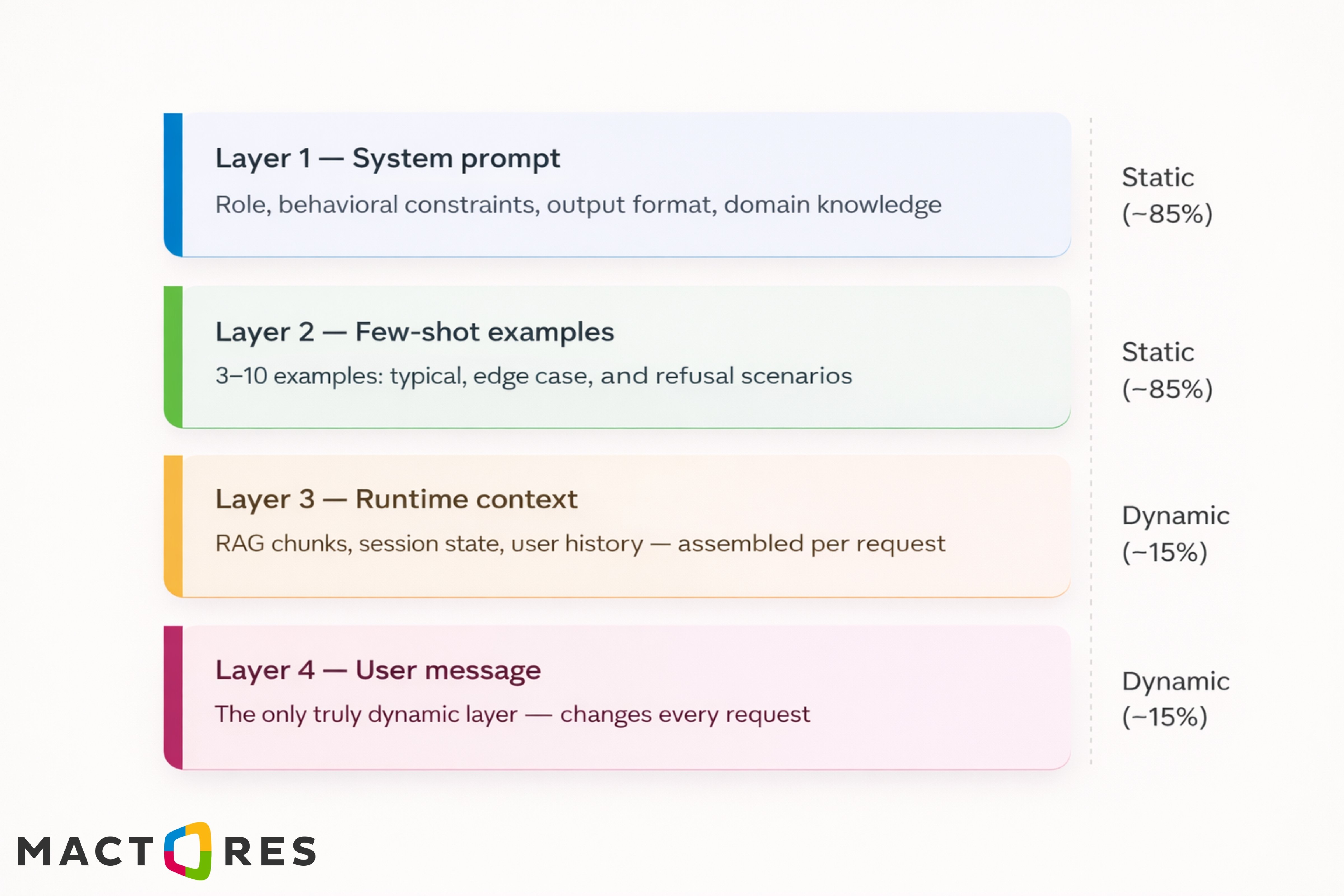
A production-grade prompt is a layered system. Each layer has a distinct job, a defined token budget, and critically, a different update frequency. That last property is what makes caching possible.
Here's how the four layers break down:
Why This Separation Matters?
In a typical production prompt, Layers 1 and 2 account for roughly 85% of total input tokens — and they're identical across thousands of requests. Without architectural discipline, you're billing for that redundancy every single time. The layered model is the prerequisite for everything that follows: once you've cleanly separated static from dynamic content, caching becomes straightforward.
Few-Shot Examples Are Doing More Work Than You Think
There's a persistent belief in enterprise AI teams that better instructions lead to better outputs. Write more precisely, add more constraints, and be more explicit about what you want. In practice, this hits a ceiling fast. Instructions tell the model what to do. Examples show what good looks like — and that distinction matters more than most teams realize.
When you provide a few-shot example, you're not just giving the model a reference point. You're activating patterns from its training that align with the format, tone, reasoning style, and decision logic embedded in that example. A well-constructed example set does more heavy lifting than three paragraphs of carefully worded instructions — and it does it more reliably across edge cases.
Designing the Example Set
The mistake most teams make is writing examples that only cover the happy path. A production example set needs to cover three distinct case types:
- Typical cases establish the baseline. These are your most common input patterns — the bread-and-butter requests your system will handle at volume. They calibrate the model's default output style, response length, and tone. Two or three of these is usually sufficient.
- Edge cases constrain variance. These are the inputs that sit at the boundary of your task definition — ambiguous queries, incomplete information, unusual phrasing, and multilingual inputs if relevant. Without explicit edge case examples, models will generalize in ways you didn't anticipate, and you'll find out in production.
- Refusal cases enforce boundaries. These show the model exactly when not to answer, and how to decline. This is especially critical in enterprise deployments where the system prompt defines a narrow scope, and you need the model to hold that boundary consistently.
The Instruction-to-Example Conversion Rule
A useful heuristic: if you've written more than three sentences trying to describe a behavior, stop and write an example instead. Instructions like "When the user's query is ambiguous, ask a clarifying question rather than making assumptions, but only if the ambiguity would materially affect the output" are harder for the model to apply consistently than a single edge case example that demonstrates exactly that behavior.
This conversion also has a caching benefit. Your example set lives in Layer 2 — static, cached, processed once. Every token you spend on verbose instructions in Layer 1 that could be replaced by a cached example is a token you're paying for less efficiently.
How Many Examples Are Enough?
There's no universal answer, but a practical starting range is three to seven for most enterprise tasks. Below three, you're not covering enough variance. Above ten, you're consuming a significant token budget, and the marginal return diminishes. The right number is the minimum that produces consistent output across your full input distribution — measure it empirically against a held-out test set, not by intuition.
One more thing worth noting: example order matters. Models exhibit recency bias — they weight later examples more heavily. Put your most important behavioral constraint last in the example set, not first.
Reasoning Patterns That Work in Production
Single prompts work for simple tasks. For multi-step reasoning, tool use, or complex workflows, they become unreliable or unmanageable. Production systems rely on structured reasoning patterns that improve accuracy while interacting differently with caching.
There are four patterns worth understanding in depth. Each solves a different problem. Each has a different cost profile. And critically, each interacts with your caching strategy differently.
1. Chain-of-Thought and Extended Thinking
Chain-of-thought (CoT) improves accuracy by making reasoning explicit, especially for multi-step or high-stakes tasks.
Key design rule:
- Keep CoT instructions in the system prompt (cached layer)
- Only the problem statement should vary per request
Extended thinking (model-level feature) adds deeper reasoning at higher token cost — use selectively for tasks where accuracy matters more than latency.
2. ReAct Loops for Tool Use
ReAct — Reason + Act — is the pattern underlying most production LLM agents. The model alternates between reasoning about what to do next and taking an action: calling a tool, querying a database, or running a calculation. It then incorporates the result into the next reasoning step and repeats until the task is complete.
The prompt architecture for ReAct maps directly onto the caching model with a clean split:
The cached prefix — system prompt plus tool schema — is what makes ReAct loops economically viable at scale. The Thought/Action/Observation history that accumulates with each iteration is the only part you're paying full price on.
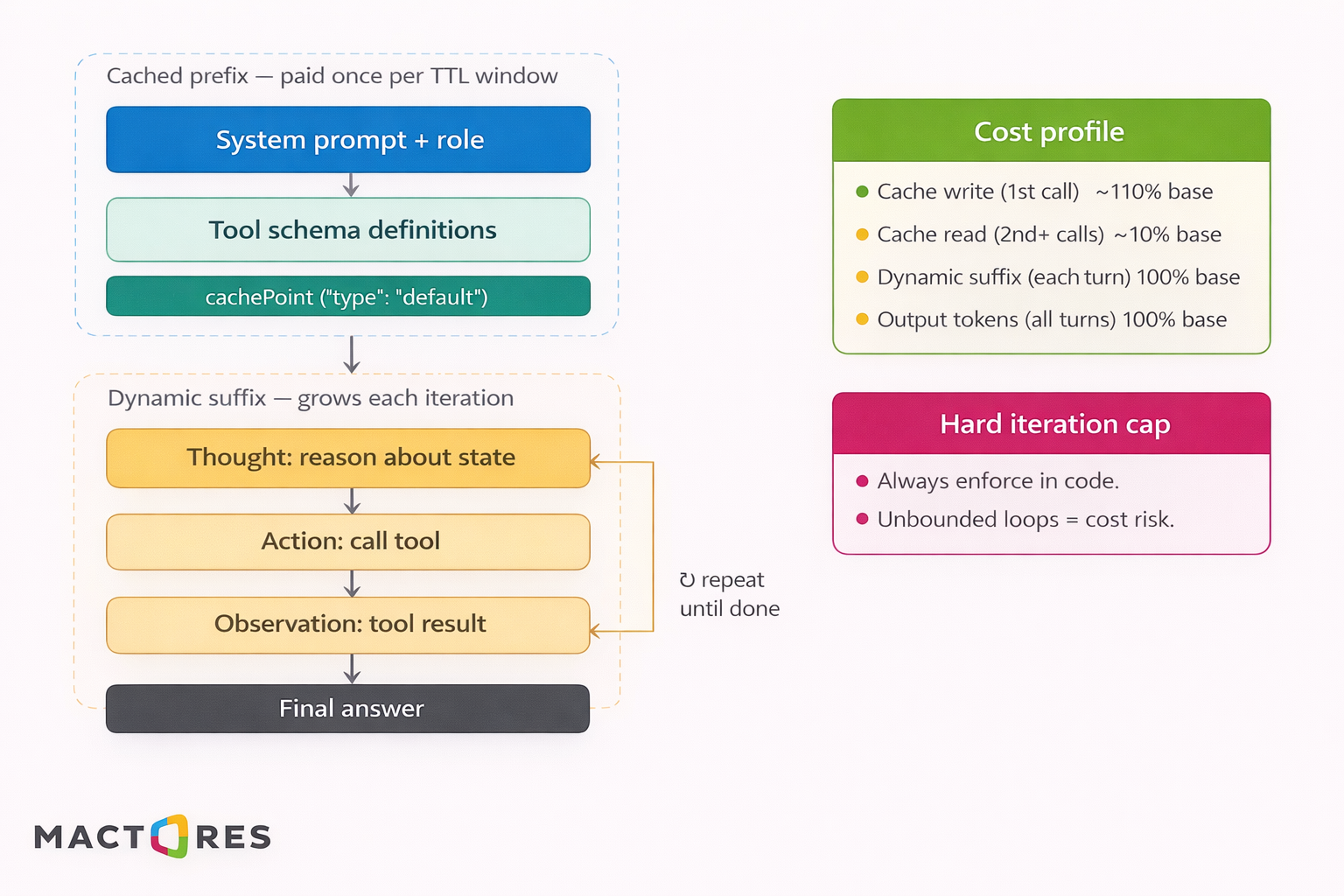
In production, always enforce a hard iteration cap. An unbounded ReAct loop is both a cost risk and a reliability risk — if a tool returns unexpected output, the model can reason in circles indefinitely.
3. Self-Consistency Sampling
Run the same prompt multiple times and aggregate results.
- Improves reliability for classification and decision tasks
- With caching, additional runs cost ~10% of input tokens
Best for high-stakes decisions, not open-ended generation.
4. Prompt Pipelines with AWS Step Functions
Break complex tasks into multiple steps, each with its own prompt.
- Each step has a separately cached system prompt
- Improves reliability and retry control
- Works well with orchestration tools like AWS Step Functions
At scale, caching makes multi-step pipelines economically viable.
Choosing the Right Pattern
|
Pattern |
Best for |
Token overhead |
Cache benefit |
|
Chain-of-thought |
Multi-step reasoning, auditability |
Medium — extra output tokens |
High — instruction is cached |
|
ReAct |
External tool use, agentic tasks |
High — multi-turn history |
High — tool schema is cached |
|
Self-consistency |
High-stakes classification |
High — N × input |
Very high — N cache reads |
|
Complex multi-stage workflows |
High — multiple calls |
High — each step cached independently |
The common thread: in each pattern, the expensive structural scaffolding belongs in the cached system prompt. The dynamic, per-request content stays in the user's turn. Get that separation right, and the cost profile of even the heaviest patterns becomes manageable.
Prompt Caching on AWS Bedrock: How It Works and How to Implement It
Most input token cost in production LLM systems is redundant — the same system prompts, examples, and schemas are sent and billed repeatedly. Prompt caching eliminates this by reusing computation at the model level, not the application layer.
This isn’t a traditional cache. Bedrock stores the model’s internal attention state (KV cache) for a prompt prefix and reuses it on subsequent requests. You still make the API call — but skip the most expensive part: input token processing.
What Actually Gets Cached?
LLM inference has two stages:
- Input processing (parallelizable, expensive)
- Output generation (sequential, unavoidable)
Caching targets input processing. The model computes attention states for each token and stores them at a defined cachePoint. On a matching prefix, it resumes from that state instead of recomputing.
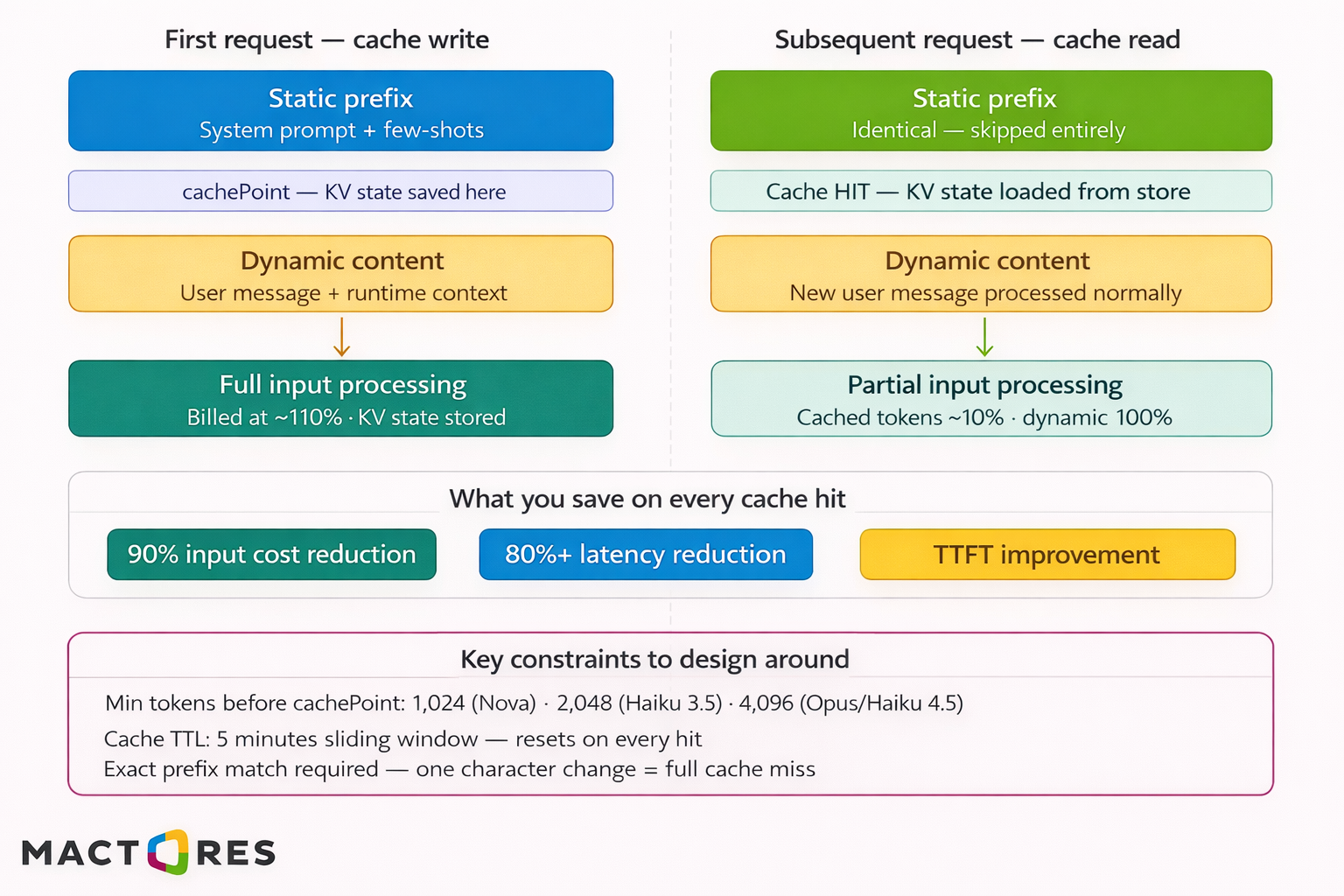
The pricing is asymmetric:
- Cache write → ~110% cost (first request)
- Cache read → ~10% cost (subsequent requests)
At scale, this shifts cost dramatically — e.g., a 2,000-token prompt across 100K requests drops from ~200M tokens/day to ~20M with full cache hits.
Step-by-Step Implementation
1. Separate static vs dynamic content
- Static (cached): system prompt, examples, schemas
- Dynamic: user input, RAG context, history
2. Insert cache point
3. Track cache metrics
Monitor:
- cacheReadInputTokens → cache hits
- cacheCreationInputTokens → cache writes
Healthy pattern:
- First call → write
- Subsequent calls → reads
4. Handle invalidation explicitly
Use prompt versioning:
Changing it forces a cache miss and rebuild.
The Real Cost Math
Here is what the numbers look like in practice for a 2,000-token system prompt at 100,000 daily requests:
|
Scenario |
Effective daily input tokens |
Relative cost |
|
No caching |
200,000,000 |
100% |
|
100% cache hit rate |
~20,200,000 |
~10% |
|
80% hit rate (realistic) |
~56,000,000 |
~28% |
|
60% hit rate (cold traffic) |
~92,000,000 |
~46% |
Even at ~80% hit rate, input costs drop by over 70%.
Multiple Cache Points
You can define multiple cachePoints to cache independent static blocks:
Each cache point stores the prefix up to that point. If one segment changes (e.g., reference doc), only that cache layer is invalidated — not the entire prompt.
Semantic Caching: How to Eliminate 20-60% of LLM Calls Before They Happen
Prompt caching saves money on calls you make. Semantic caching eliminates calls entirely.
The distinction matters. Prompt caching operates inside the model — it reuses computed attention state for a matching prefix. Semantic caching operates at the application layer, before the request ever reaches Bedrock. If a semantically equivalent question has already been answered recently, you return the cached response directly. The model is never invoked. No input tokens, no output tokens, no latency.
At scale, this is significant. Support bots, internal Q&A tools, document analysis systems — any workload where users ask variations of the same underlying questions — can realistically eliminate 20–60% of LLM calls through semantic deduplication alone. That's not a theoretical ceiling. It's what happens in practice when threshold calibration is done correctly.
How Does it Work?
The mechanism is straightforward. Every incoming user query gets embedded using a fast embedding model. That embedding is compared against a vector store of previously answered queries. If the similarity score exceeds a configured threshold, the cached response is returned immediately. If not, the request proceeds to Bedrock, and both the query embedding and the response get written to the cache for future hits.
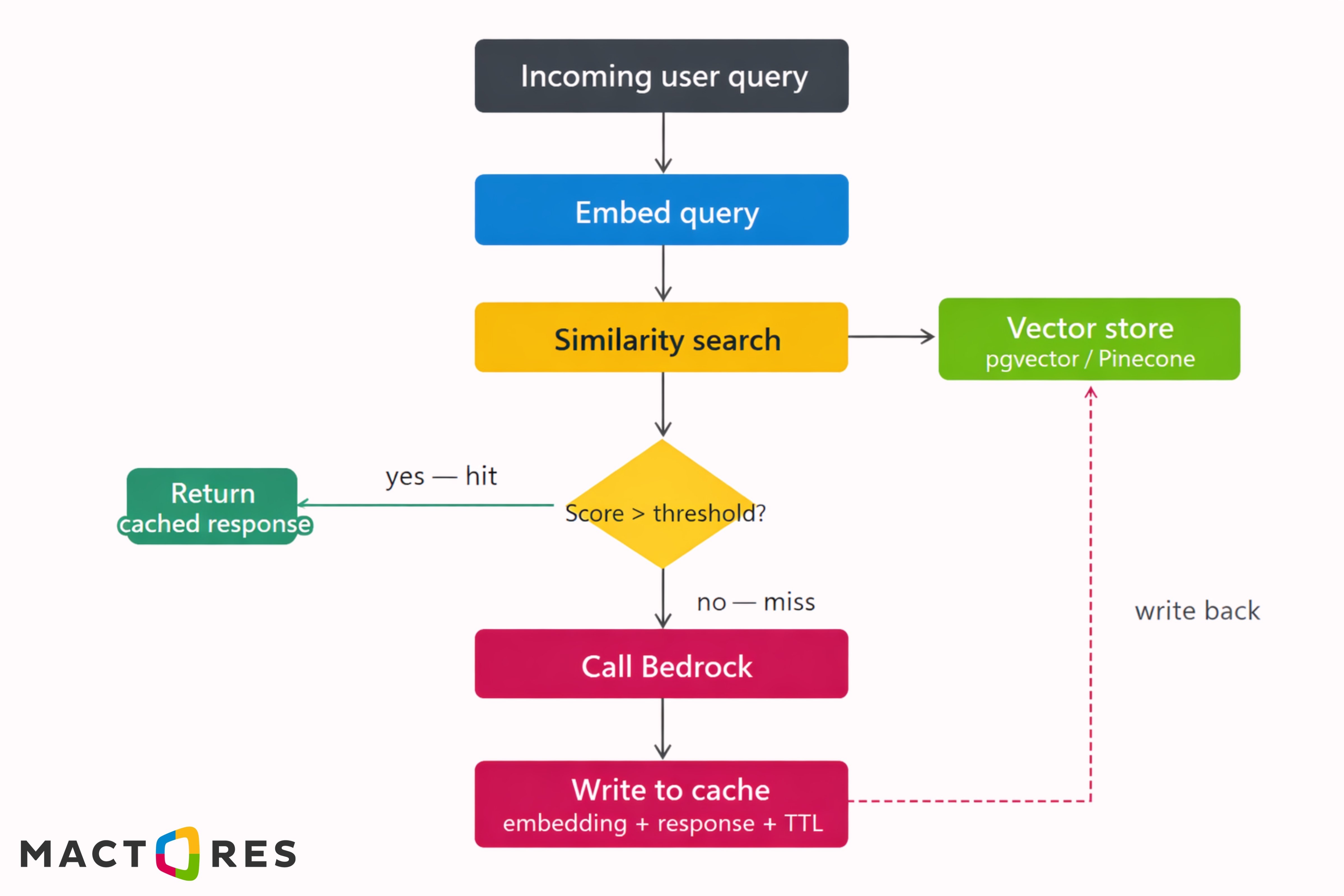
The infrastructure stack is lean: an embedding model (Titan Embeddings or a dedicated model via Bedrock), a vector store with TTL support (pgvector on RDS, Pinecone, or OpenSearch), and a response store keyed to the embedding.
Semantic Caching vs Prompt Caching - Used Together
These two caching layers are complementary, not alternatives. Semantic caching operates before the API call — it can eliminate the call entirely. Prompt caching operates inside the API call — it reduces the cost of calls that do proceed. In a well-architected system, both are active simultaneously:
|
Layer |
Where it Operates? |
What it Saves? |
Hit condition |
|
Semantic cache |
Application layer |
Entire API call |
Similar query answered recently |
|
Prompt cache |
Model layer (Bedrock) |
Input token processing |
Exact prefix match within TTL |
A request that misses the semantic cache still hits the prompt cache on its static prefix. A request that hits the semantic cache never reaches Bedrock at all. Together, the two layers cover different failure modes and different cost vectors, which is exactly why production systems need both.
Conversation Memory in Production: Four Strategies and Their Cache Implications
Most teams treat conversation memory as solved: append full history on every request. It works in demos, but in production, it creates two issues - cost grows linearly, and cache hit rate drops with every turn.
The reason is structural. Bedrock caching depends on an exact prefix match. Each new message changes the prefix, causing a cache miss. A naïve full-history approach effectively disables caching beyond the first turn, forcing full input token cost on every request.
Conversation memory isn’t just a UX choice — it’s a cost and caching architecture decision.
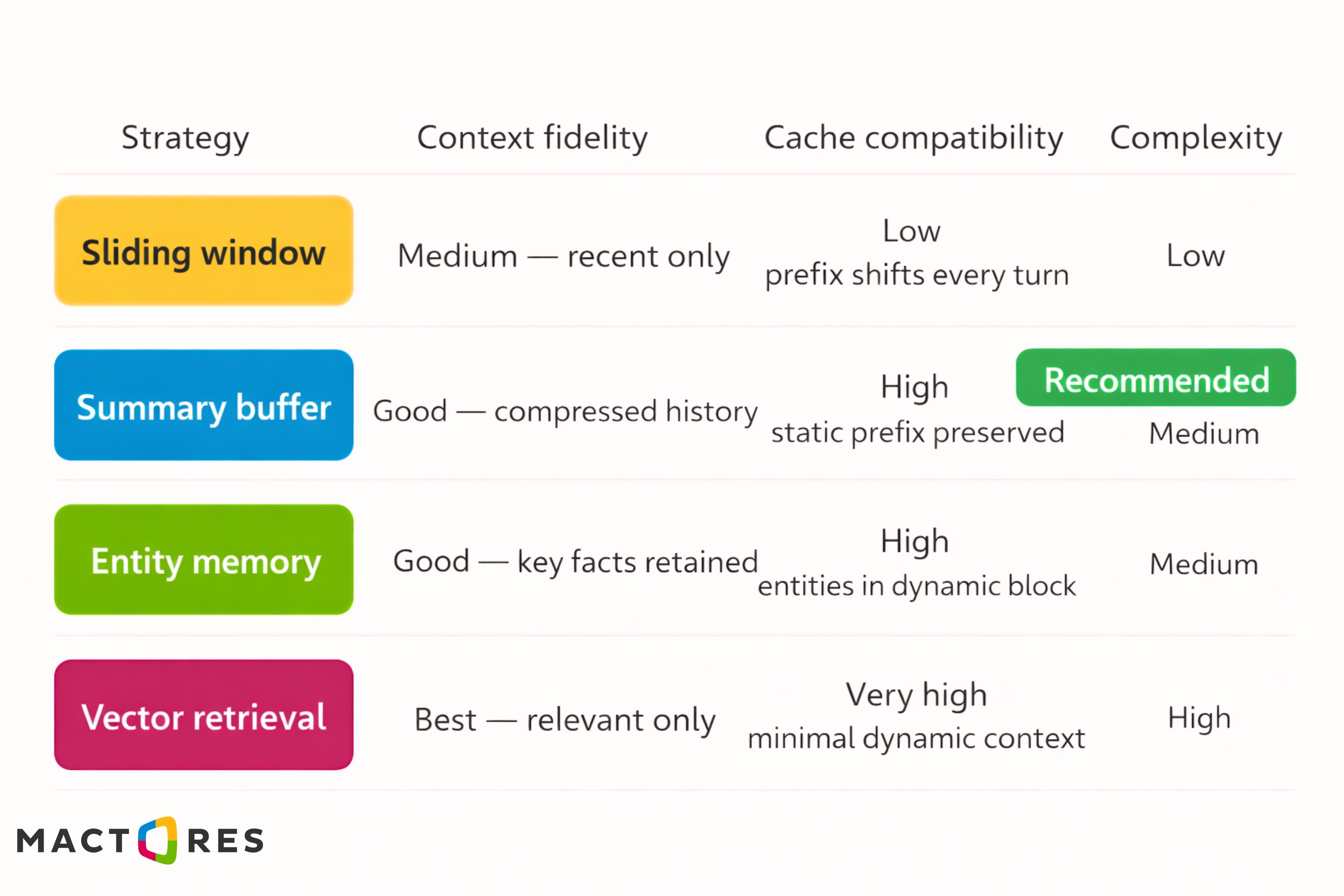
Strategy 1: Sliding Window
The sliding window keeps the N most recent turns in the message array and drops everything older. It's the simplest implementation — a single deque with a max length, and it's the default approach most teams reach for first. Use a sliding window only for short, transactional conversations where history beyond the last few turns is genuinely irrelevant. For anything with session continuity — multi-turn support conversations, ongoing analysis sessions — the cache incompatibility makes it the wrong default.
Strategy 2: Summary Buffer
The summary buffer compresses older turns into a running summary, while keeping the most recent turns verbatim. The summary gets injected into the dynamic context block. Critically, the system prompt and few-shot examples above the cachePoint remain completely unchanged — which means they stay cached across every turn in the conversation.
This is the strategy with the best cache compatibility for most production use cases. The static prefix is never touched. Only the dynamic block changes, and even that grows slowly because history is compressed rather than accumulated raw.
The compression call itself is cheap — it's a short, focused prompt with a small output. The token savings on subsequent turns more than offset it within a few exchanges.
Strategy 3: Entity Memory
Entity memory takes a different approach: instead of summarizing conversation flow, it extracts and tracks specific entities — people, decisions, preferences, constraints, open questions — and maintains a structured store of those facts. Only the relevant entities get injected into the dynamic context block per turn, keeping the dynamic section small and stable.
Entity memory works well for structured workflows — sales conversations tracking deal parameters, support sessions tracking account details, advisory tools tracking user constraints. It performs poorly when the conversation is exploratory, and entities aren't well-defined upfront.
Strategy 4: Vector Retrieval
Vector retrieval treats conversation history as a searchable store. Each turn is embedded and stored. On each new request, only the turns most relevant to the current query are retrieved and injected into the dynamic context block — the rest of the history is ignored.
Vector retrieval gives you the best context fidelity at scale — long conversations don't degrade quality because you're always injecting the most relevant history, not the most recent. The dynamic context block stays bounded regardless of how long the session runs.
The tradeoff is infrastructure complexity: you need an embedding model, a vector store, and retrieval logic wired into your prompt assembly layer. For short conversations, this is overkill. For long-running sessions — multi-hour customer advisory calls, persistent project assistants, ongoing research tools — it's the right architecture.
Which Strategy to Use?
The decision tree is straightforward when you frame it around session length and cache priority:
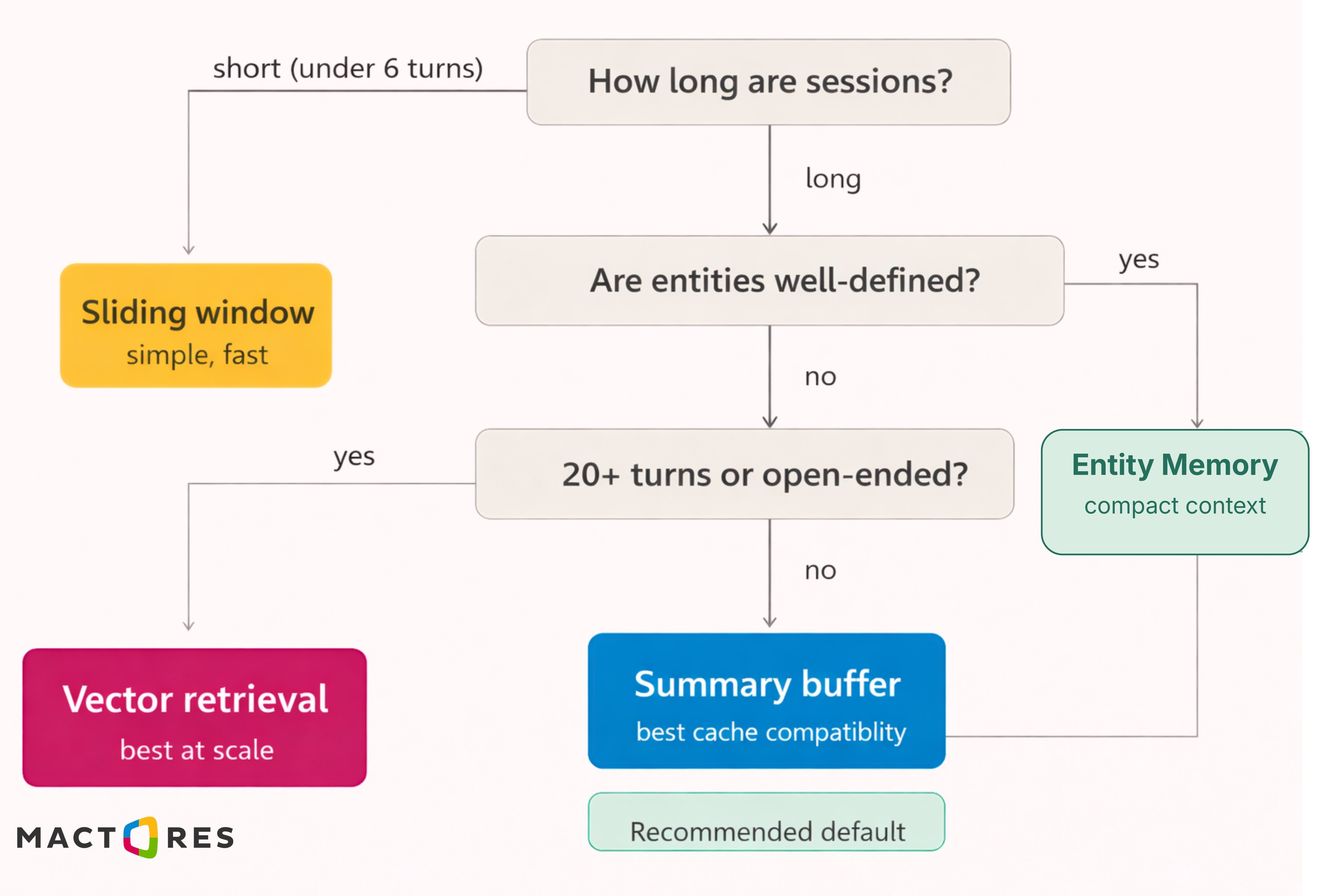
For most enterprise deployments, the summary buffer is the right default. It preserves cache stability on the static prefix, your most valuable caching asset, while keeping conversation context coherent across sessions of moderate length. Entity memory pairs well with it when your domain has well-defined, trackable facts. Vector retrieval is worth the infrastructure investment only when sessions regularly exceed 20 turns or context windows get genuinely large.
The production recommendation that holds across most team setups: summary buffer for history management, entity memory for structured fact tracking, both injected into the dynamic block below your cachePoint. The system prompt and a few-shot examples above it stay completely untouched — and cached — for the entire session.
How to Design Prompts for Maximum Cache Efficiency?
Prompt caching doesn’t work by default — it only works if your prompt is structured for it. The constraint is strict: Bedrock caches based on an exact prefix match. Change even a single token before the cache point, and you get a full cache miss.
That makes prompt design a cache optimization problem, not just a prompting problem.
1. Separate Static and Dynamic Content (Hard Boundary)
A production prompt should be cleanly split into:
- Static (cacheable)
System prompt + few-shot examples - Dynamic (non-cacheable)
User input + runtime context
Everything above the cache point must be completely deterministic. No timestamps, no IDs, no session data.
If dynamic data leaks into the prefix, caching breaks entirely.
2. Treat System Prompt + Examples as Immutable Assets
In most systems, these layers account for ~80–85% of tokens and are identical across requests.
That makes them your primary caching surface.
Best Practices:
- Keep examples fixed (no per-request variation)
- Maintain deterministic ordering and formatting
- Update only when task behavior changes
Think of them as compiled artifacts, not generated text.
3. Eliminate High-Entropy Tokens
Anything that changes per request destroys cache reuse:
- Timestamps
- UUIDs
- Debug metadata
Even harmless-looking additions can invalidate the entire prefix.
If a token doesn’t affect model behavior, it doesn’t belong in the cached region.
4. Canonicalize Prompt Construction
Two prompts can mean the same thing, but still miss the cache due to formatting differences.
Avoid:
- Free-form string building
- Inconsistent phrasing
- Non-deterministic JSON ordering
Use:
- Fixed templates
- Deterministic serialization
- Standardized instruction blocks
Treat prompts like structured programs, not strings.
5. Align Cache Boundaries with Prompt Layers
The cache point should sit exactly between static and dynamic layers:
- Above → cached once
- Below → processed every request
In more complex systems, you can introduce multiple cache points to isolate large static blocks independently.
6. Control Dynamic Context Growth
Caching only saves on the prefix. If your runtime context grows unbounded (e.g., full conversation history), your costs still scale linearly.
Use:
- Summary buffers
- Entity memory
- Selective retrieval
These keep the dynamic portion small while preserving relevance.
Conclusion
Prompt caching fundamentally changes the cost structure of enterprise LLM systems. By eliminating redundant input processing, it enables up to 90% cost reduction while improving latency and making advanced patterns like multi-step pipelines and self-consistency economically viable.
But these gains don’t come from enabling a feature — they come from intentional system design. Teams that structure prompts correctly, separate static and dynamic context, and align memory strategies with caching consistently outperform those optimizing only at the model or infrastructure layer.
At Mactores, this is exactly how production-grade AI systems are built — treating prompt architecture, caching, and orchestration as first-class design concerns, not afterthoughts.
Ultimately, the takeaway is simple:
The biggest cost savings in AI don’t come from better models — they come from better system design.