.svg)
.svg)
.svg)
It usually starts with a straightforward plan. A team decides to migrate a billing application from a legacy on-premises Oracle environment to a modern infrastructure platform. The architecture appears simple enough: the application runs against a single schema inside the company’s Oracle database. In theory, the migration should involve exporting the schema, provisioning a new database environment, and moving the application along with its data.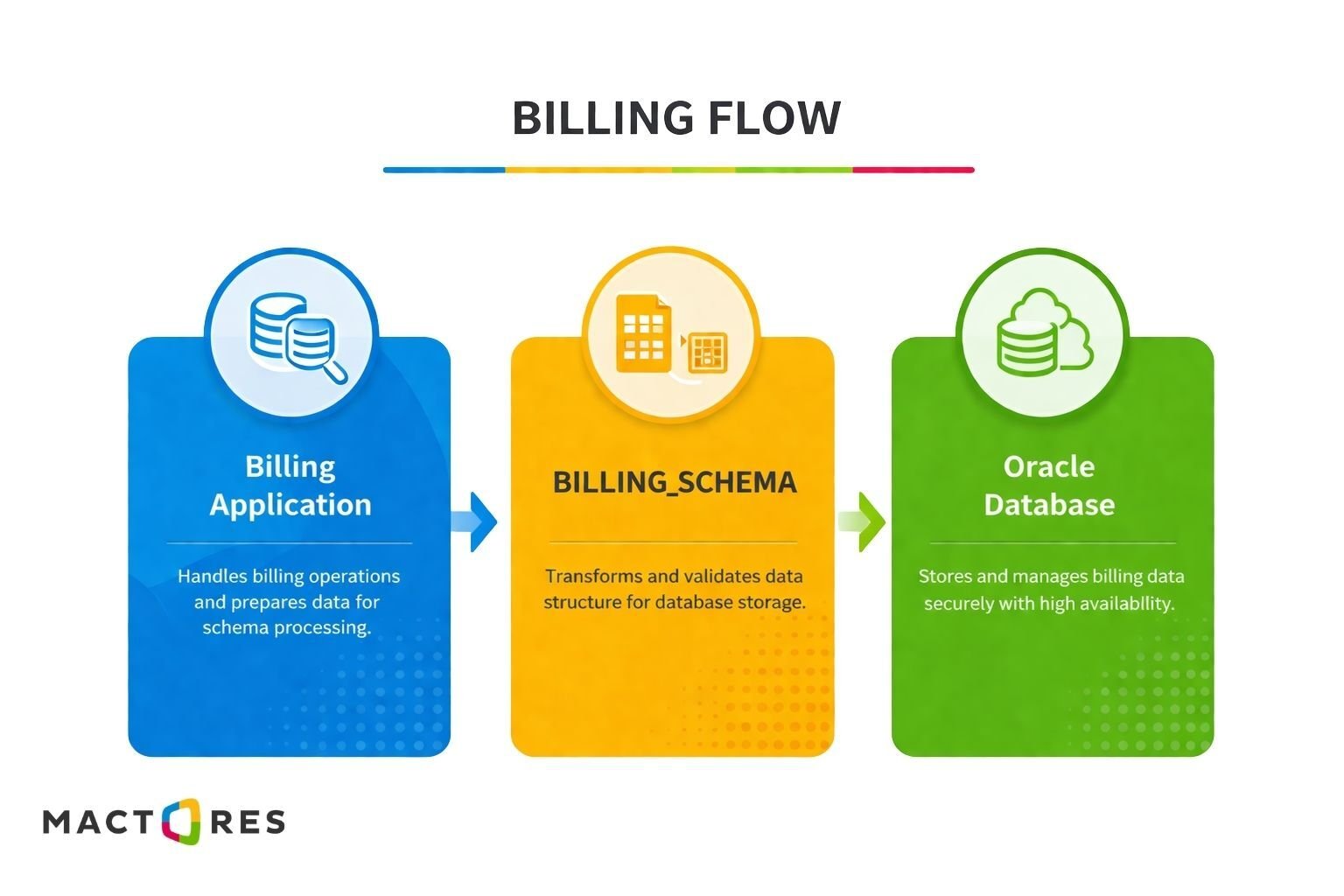 Before moving forward, however, the database team performs a quick dependency check standard practice before extracting a schema from a shared database instance.
Instead of confirming the expected isolation, the results reveal something unexpected.
What initially appeared to be a single application schema is actually connected to multiple other systems. Stored procedures reference tables owned by other schemas, reporting packages depend on analytics objects, and views join data from shared operational tables. Extracting the billing schema now risks breaking financial workflows, reporting pipelines, and potentially other applications that rely on the same data.
This situation is more common than many teams expect. Over years of development, Oracle databases often evolve from isolated application backends into shared data platforms, where multiple systems interact through the same schemas, tables, and PL/SQL logic. These connections are rarely documented, and they often remain invisible until teams attempt to separate or migrate a workload.
During Oracle modernization and infrastructure transformation initiatives, such as those undertaken with partners like Mactores, this discovery phase frequently becomes the first major technical hurdle. What looks like a straightforward database migration quickly turns into a deeper investigation of how applications, schemas, and operational processes are intertwined inside the database layer.
Understanding these hidden relationships is the first step in untangling a shared Oracle environment safely and avoiding the costly surprises that often emerge during modernization projects.
How Shared Oracle Environments Actually Evolve?
Very few Oracle environments are intentionally designed to be tightly coupled across multiple applications. In most cases, shared database environments evolve gradually through a series of practical decisions made over time. What begins as a clean, application-specific schema can slowly become part of a larger shared ecosystem as new systems, teams, and reporting needs emerge.
A typical progression might look something like this: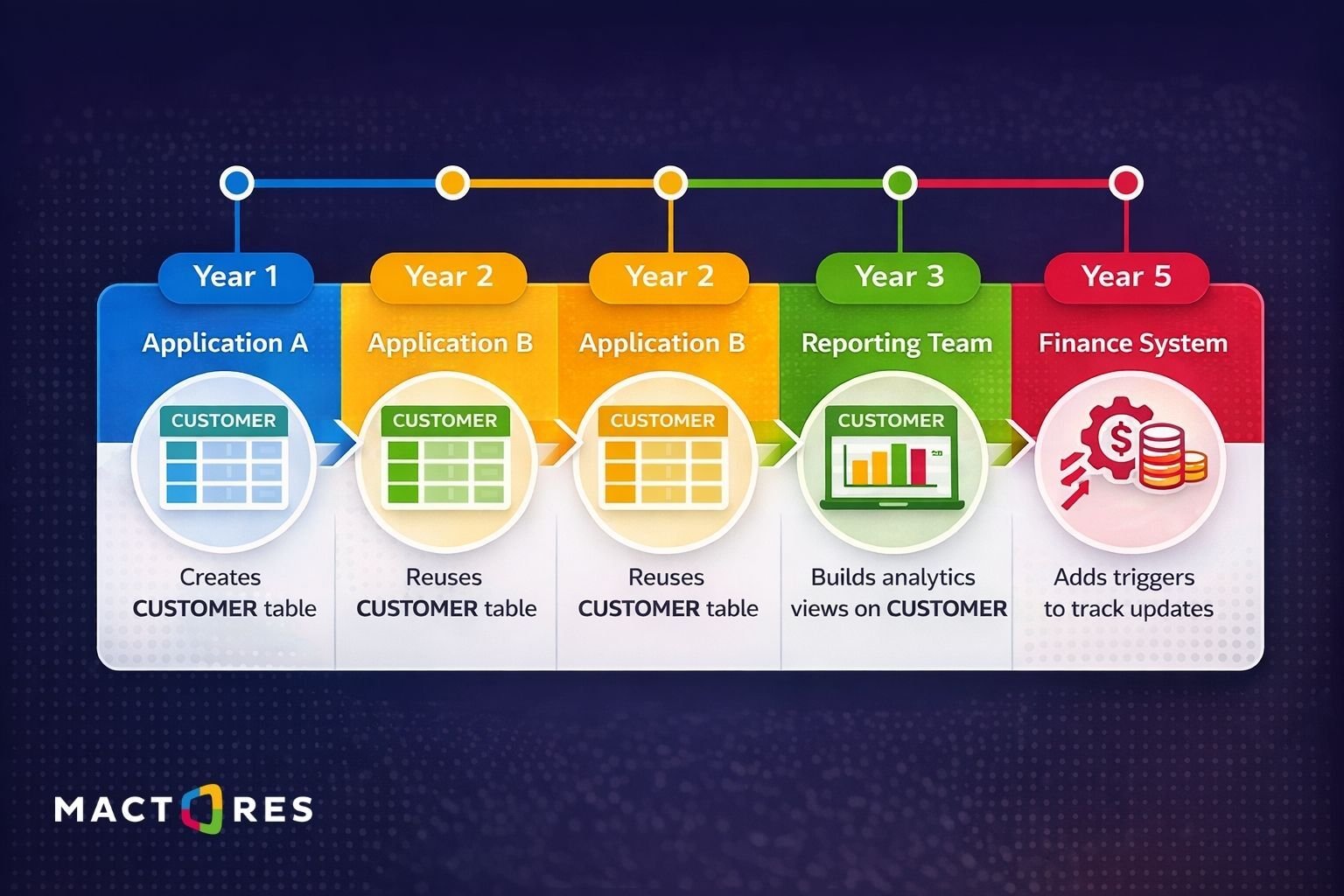 Each step seems reasonable in isolation. Reusing an existing table avoids duplicating data. Reporting teams prefer querying production systems rather than building separate pipelines. Developers often expose useful logic through shared PL/SQL packages. Over time, however, these incremental changes create a database where multiple applications depend on the same objects, often without clear ownership boundaries.
Several common patterns contribute to this evolution.
One of the most frequent is schema reuse. Instead of creating isolated data models for each system, teams build new applications on top of existing tables. For example, a customer service platform might rely on customer records created by an order management system:
Another common pattern involves shared PL/SQL utilities. Teams often centralize business logic inside reusable packages. While this improves consistency, it also creates runtime dependencies between systems.
If multiple applications call the same package, changes to that package or attempts to move the schema can affect several systems simultaneously.
Over time, reporting and analytics workloads add another layer of coupling. Instead of maintaining separate analytical datasets, reporting teams frequently build views or queries directly against operational tables. These dependencies may not be obvious at the schema level, but can become critical once systems are separated.
The result is that the database gradually shifts from serving a single application to functioning as a shared integration layer between multiple systems. By the time teams attempt to isolate one application for migration or modernization, the original boundaries between systems may no longer exist.
Understanding how these environments evolve is important because it explains why untangling them is rarely a simple technical task. What appears to be a single schema often represents years of accumulated architectural decisions embedded directly within the database layer.
Investigating the Environment: Where the Hidden Dependencies Live
Once a team suspects that an Oracle environment may be shared across multiple systems, the next step is investigation. In many cases, the true complexity of a database is not visible in application documentation or architecture diagrams. Instead, it is embedded in the database metadata itself—through dependencies, privileges, synonyms, and other internal relationships.
For DBAs, this investigation usually begins with Oracle’s system catalog views, which expose how objects reference one another inside the database.
1. Identifying Cross-Schema Dependencies
One of the most useful starting points is the DBA_DEPENDENCIES view. It reveals when an object in one schema references an object in another schema.
This query often surfaces dependencies such as:
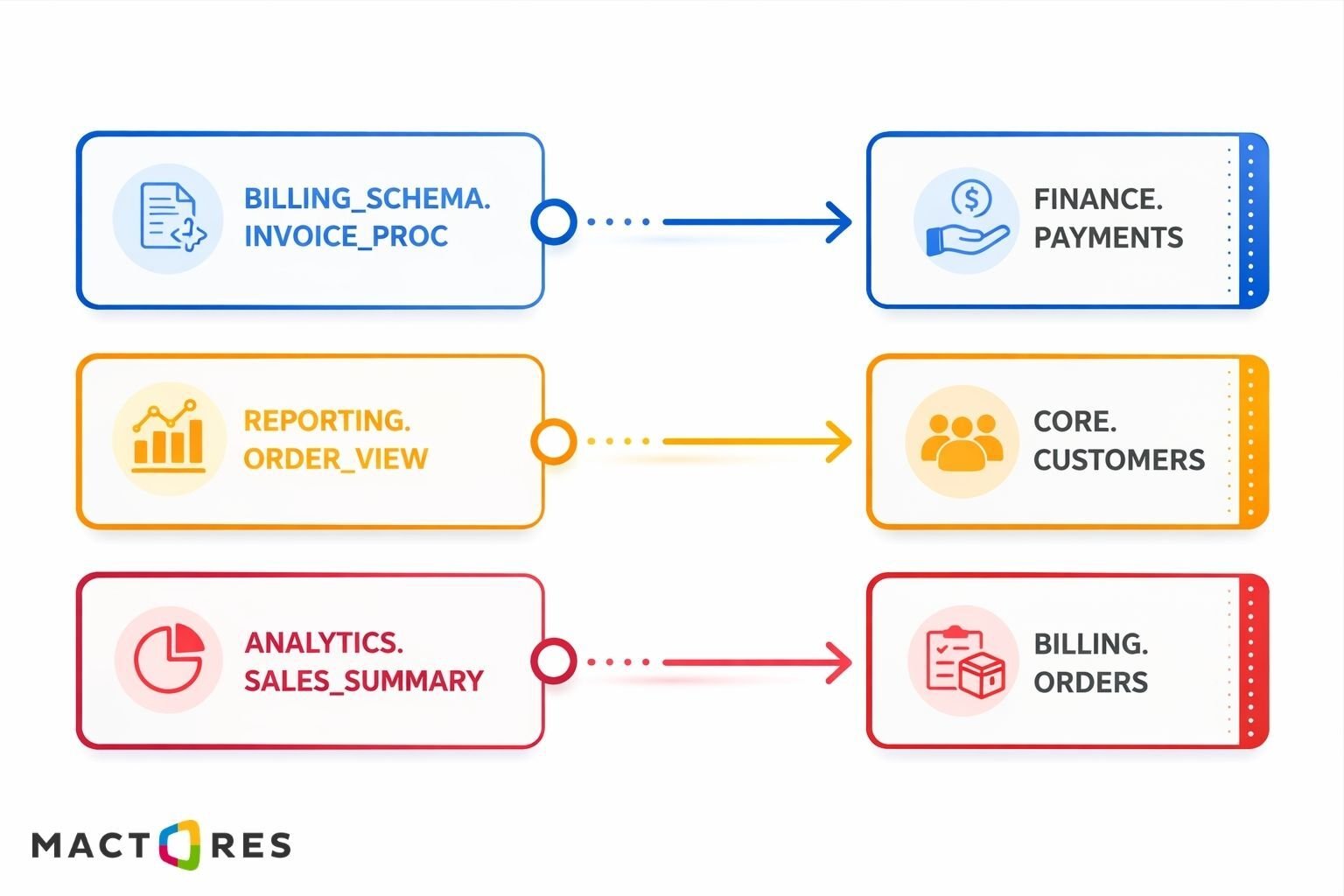 These relationships indicate that objects across multiple schemas are interacting. A stored procedure in one application may rely on a table owned by another, or a reporting view may depend on operational data maintained elsewhere.
2. Finding Cross-Schema Privileges
Another indicator of a shared environment is unexpected privilege sharing. Over time, schemas may grant access to tables or views so that other applications can query them directly.
DBAs can identify these patterns using the DBA_TAB_PRIVS view:
Results from this query frequently reveal application schemas that have been granted access to tables owned by other teams. While these permissions are often added to support reporting or integration workflows, they also create hidden dependencies that complicate future separation.
3. Detecting Synonyms That Mask Ownership
Synonyms are another common source of confusion. They allow developers to reference objects without specifying the owning schema, which can make cross-schema dependencies difficult to detect.
For example, an application might query a table using:
But behind the scenes, a synonym may map orders to core.orders, meaning the application is actually dependent on another schema entirely.
By combining information from these catalog views, DBAs can begin building a clearer picture of how schemas interact. What initially appears to be a simple application database often turns out to be a network of interconnected objects, views referencing external tables, procedures calling packages from other schemas, and applications relying on privileges granted years earlier.
This investigation phase is critical. Without a clear understanding of these relationships, attempting to isolate or migrate a single schema can easily break other systems that depend on the same underlying objects.
The Dependency Graph Problem
Once dependencies start to surface, many Oracle environments reveal a deeper structural issue: they behave less like isolated application databases and more like dependency graphs.
Instead of each schema operating independently, multiple schemas reference one another through views, procedures, foreign keys, and triggers. Over time, these relationships form a network of interconnected objects.
A simplified example might look like this:
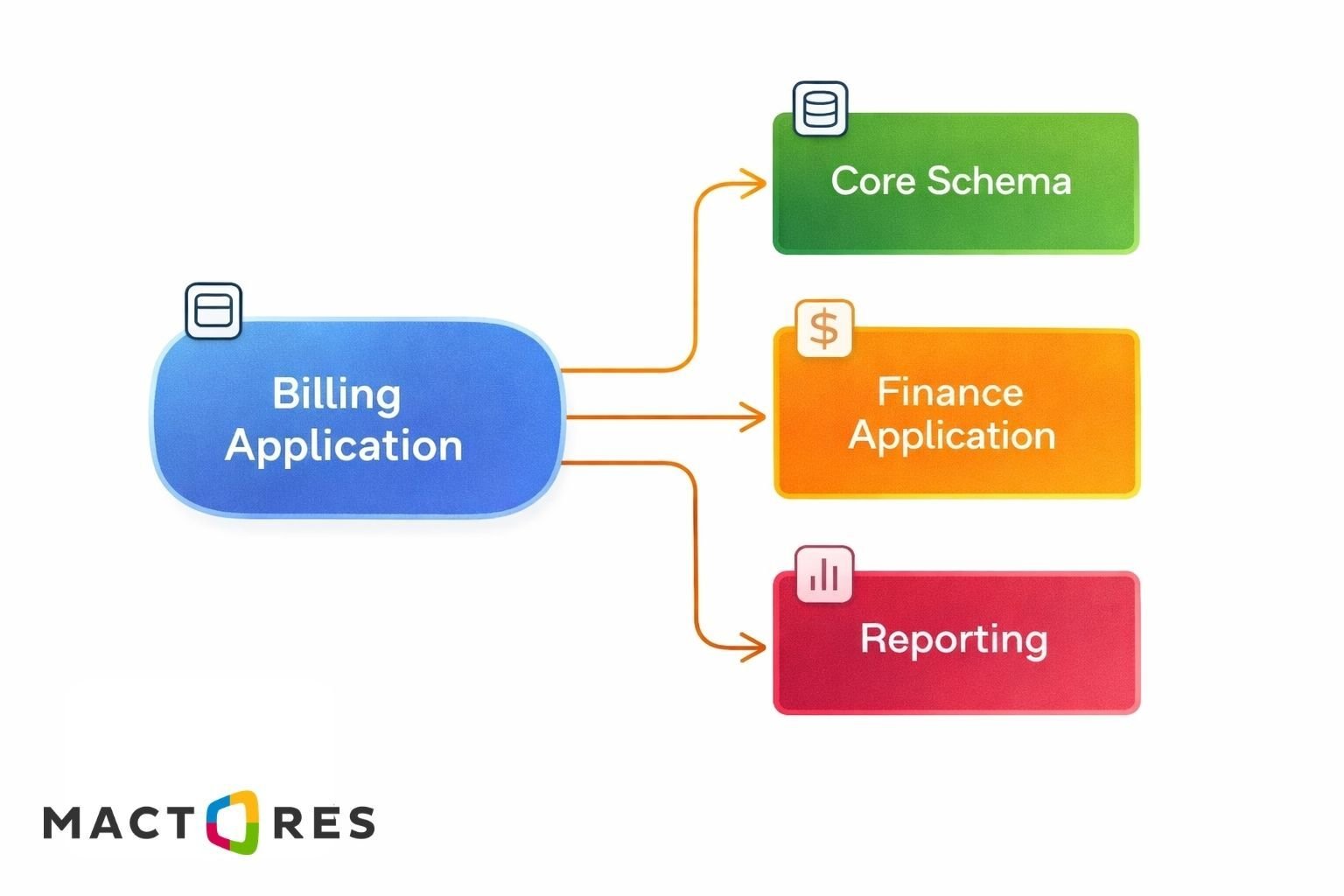 Each connection in this graph can represent several types of dependencies:
- Views referencing tables in another schema
- PL/SQL packages calling procedures across schemas
- Foreign key constraints linking tables
- Triggers writing data into other schemas
For example, a reporting view might combine operational data from multiple systems:
At this point, the reporting system depends on both schemas being available and consistent.
As more applications interact with the same database, the graph becomes increasingly complex. Removing or migrating one schema may break multiple dependency paths at once. This is why untangling shared Oracle environments is rarely just a schema migration; it often requires carefully analyzing and restructuring the entire dependency graph.
Hidden Coupling That Makes Separation Difficult
Even after identifying obvious dependencies, many Oracle environments still contain hidden coupling that complicates separation. These dependencies are often introduced through common Oracle features that mask how schemas interact.
1. Synonyms
Synonyms allow applications to reference objects without specifying the owning schema.
Developers may query the table like this:
But the actual data lives in core.orders. If the CORE schema is moved or separated, the application can break without any obvious change in its own code.
2. Triggers
Triggers can introduce cross-schema logic that runs automatically during data operations.
Here, inserting into billing.orders automatically write data into a finance schema. If the billing schema is migrated independently, this trigger may fail or silently stop recording financial audit data.
3. Reporting Queries
Reporting workloads often create additional coupling by joining operational tables across schemas.
If these schemas are separated into different databases, queries like this may require database links, data replication, or redesigned reporting pipelines.
These kinds of dependencies are easy to overlook during early migration planning, but they frequently become major blockers when teams attempt to untangle shared Oracle environments.
Operational Dependencies Outside the Database Objects
Not all dependencies are visible in tables, views, or PL/SQL code. Many shared Oracle environments also rely on operational processes that interact with multiple schemas at once. These dependencies can be just as disruptive when systems are separated.
1. Batch Jobs
Scheduled jobs often execute procedures across multiple schemas within the same database instance. If the billing and finance schemas are moved to separate databases, this job will no longer work as written. Teams must redesign job orchestration, authentication, and execution flows.
2. Monitoring and Alerting
Monitoring tools are frequently configured around shared database instances rather than individual applications. Alerts may track:
- tablespace usage
- instance-level performance metrics
- shared session activity
Once schemas are separated into different environments, monitoring strategies must be reconfigured to reflect the new boundaries.
3. Backup and Recovery
Shared Oracle environments also tend to share backup infrastructure. RMAN policies, archive logs, and recovery procedures are typically designed around the entire database instance.
Separating workloads may require:
- new backup policies
- independent recovery strategies
- updated retention configurations
These operational dependencies are often discovered late in modernization projects, adding unexpected engineering work beyond the database schema itself.
Migration Mechanics: What Untangling Actually Requires?
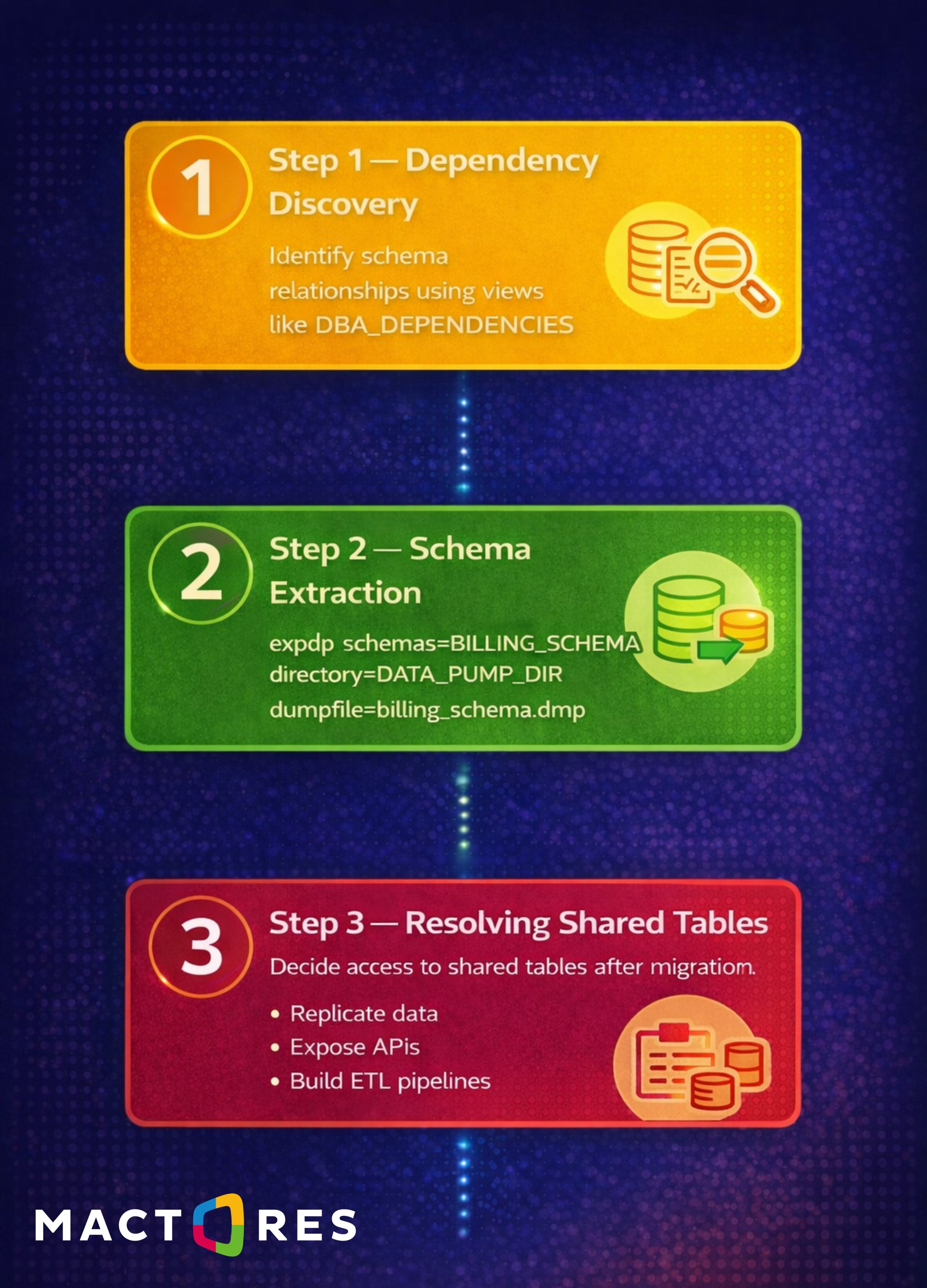
Once dependencies are mapped, the actual process of separating a shared Oracle environment involves several engineering steps. This goes beyond simply exporting a schema and importing it elsewhere.
Performance Impact After Separation
One issue many teams underestimate is how separation affects query performance.
In a shared Oracle environment, related tables often live in the same database instance. Queries can join them locally with minimal overhead.
Once schemas are separated into different databases, those joins may require database links or external data pipelines.
This change introduces several performance challenges:
- Network latency between databases
- Distributed transaction overhead
- Query optimizer limitations across database links
Queries that previously ran in milliseconds can become significantly slower when executed across environments.
Reporting workloads are particularly affected. Many analytics queries rely on large joins across operational tables, and moving those tables into separate databases often requires redesigning reporting pipelines or building dedicated data warehouses.
Because of this, performance considerations must be part of the untangling strategy from the beginning—not something addressed after migration.
Checklist Before Attempting to Untangle a Shared Oracle Environment
Before separating a schema or migrating an application, database teams should verify that key dependencies have been identified. A quick checklist can help prevent unexpected issues during migration.
1. Schema Dependencies
- Cross-schema views referencing external tables
- PL/SQL packages calling procedures in other schemas
- Synonyms masking the true ownership of objects
2. Data Relationships
- Foreign key constraints linking tables across schemas
- Shared lookup or reference tables used by multiple systems
- Reporting queries joining data from different schemas
3. Operational Dependencies
- Batch jobs executing procedures across multiple schemas
- Monitoring tools referencing shared database objects
- Backup and recovery policies tied to the entire instance
4. Performance Considerations
- Queries that will become distributed joins
- Reporting workloads dependent on operational databases
- Applications relying on low-latency local data access
Working through these checks early helps teams understand the true scope of separation. In many cases, the effort required to untangle dependencies is not obvious until these areas are examined closely.
Where Specialized Expertise Helps
For many organizations, the difficulty of untangling shared Oracle environments becomes clear only after modernization efforts begin. What initially appears to be a straightforward database migration can quickly turn into a deeper investigation of schema dependencies, operational processes, and data ownership boundaries.
This is where specialized expertise becomes valuable. During Oracle modernization and cloud migration initiatives, Mactores teams often begin by conducting dependency discovery and impact analysis across the database environment. Using system catalog views and automated analysis, they map how schemas, tables, procedures, and applications interact with one another.
This analysis helps answer critical questions early in the project:
- Which schemas are tightly coupled?
- Which tables are shared across applications?
- Which reporting or operational processes depend on the same data?
With this visibility, organizations can design incremental separation strategies rather than attempting risky “big bang” migrations. Workloads can be isolated gradually, shared data can be handled through replication or APIs, and operational processes can be redesigned to reflect the new architecture.
By combining database engineering expertise with infrastructure modernization experience, Mactores helps enterprises reduce migration risk and avoid the costly surprises that often emerge when shared Oracle environments are untangled too late in the process.
Conclusion
Shared Oracle environments rarely start out complex. Over time, however, schema reuse, cross-application queries, shared PL/SQL packages, and operational integrations gradually turn the database into a shared platform layer across multiple systems.
The complexity usually becomes visible only when teams attempt to migrate or isolate a single application. What appears to be a simple schema extraction can quickly reveal dependencies across tables, views, triggers, reporting workloads, and batch jobs.
Untangling these environments requires careful dependency analysis, data ownership decisions, and staged separation strategies. Without that groundwork, migrations can introduce unexpected breakages and performance issues.
Before attempting to isolate a schema or move a workload, it’s worth asking one critical question:
Do you truly know how many other systems depend on your Oracle schema today?